
Many people use ChatGPT every day but have never heard of an "API." Tutorials full of curl, API Key, and gpt-5.6 can make you wonder: Is this only for developers? If I can't code, am I locked out?
Short answer: No. You don't need Python or JavaScript to tap into GPT-5.6—you just use it differently than engineers do.
This guide assumes zero background: we'll separate ChatGPT from the API, walk through four realistic paths, and end with mini projects you can try today.
First things first: how is ChatGPT different from the API?
Think of it this way:
| ChatGPT (web / app) | GPT-5.6 API | |
|---|---|---|
| Who uses it | Individuals chatting directly | Software, websites, and automation tools calling in the background |
| How you use it | Open a browser, type a question | An app or platform sends a request and gets an AI reply |
| Best for | Personal Q&A, writing, learning | Embedding AI into workflows or your own product |
| How you pay | Plus / Pro subscription | Pay per use (metered billing) |
What the API actually is: not another chat window, but a way for other tools to borrow GPT-5.6's reasoning.
So the real question isn't "Can you code?"—it's what you want AI to do, and whether you're willing to spend an hour on setup.
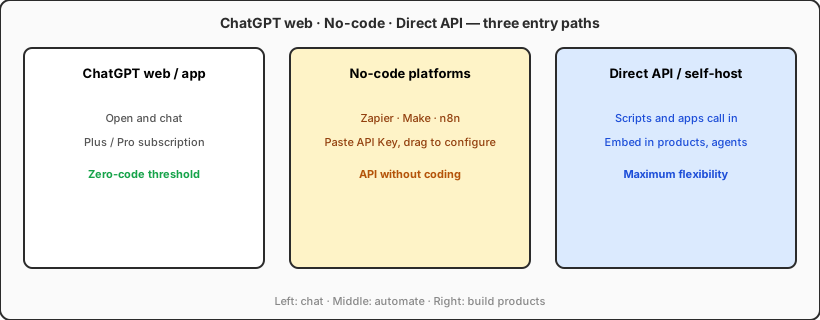
Can't code? Here are four realistic ways in
1. No-code platforms (best starting point)
In 2026, mainstream automation tools like Zapier, Make (formerly Integromat), and n8n all support OpenAI / GPT models. The typical flow:
- Sign up at platform.openai.com, enable API access, and create an API Key;
- Create a new workflow in your no-code platform;
- Add an "Call OpenAI / GPT-5.6" step, paste your key, and write your prompt.
Common use cases:
- New Gmail arrives → GPT writes a summary → posts to Slack or Microsoft Teams
- New row in a spreadsheet → AI drafts product copy → writes back to the sheet
- Support ticket arrives → AI drafts a reply → human reviews before sending
All drag-and-drop configuration—no code required.
2. Software that already includes AI
Many products ship with GPT built in. You pay the software subscription and never touch an API key: Notion AI, Slack AI, and various writing and support tools fall in this bucket.
Best for: people who want the outcome, not the infrastructure.
3. Let AI write the code for you (semi-automated path)
If you're willing to copy, paste, and follow instructions:
- Tell ChatGPT, Cursor, or Claude: "Write a small script that calls the GPT-5.6 API to…"
- Run what it generates—often just a few commands;
- If something breaks, paste the error back and ask it to fix the script.
That's not "knowing how to code"—it's describing what you need and following a recipe. In 2026 this path is surprisingly reliable.
4. AI coding tools like Cursor
Even with zero programming background, you can describe what you want in plain English: "Build a simple page where I type a question and GPT-5.6 answers it." The tool generates the code and walks you through each step; you focus on stating requirements, hitting run, and checking results. The bar is much lower than traditional programming, though it still takes patience.
Four steps from zero to your first successful call
Step 1: Register and enable the API
- Visit the OpenAI developer platform, complete signup and verification;
- Add a payment method under Billing (API is metered; new accounts often include trial credits);
- Create a key under API Keys—it's shown only once, so save it immediately.
Security note: Never share your API Key, post it in public forums, or include it in screenshots. If it leaks, someone else can run up charges on your account. Treat it like a bank card PIN.
Step 2: Pick an entry point you can handle
| Your situation | Suggested starting point |
|---|---|
| Want zero technical friction | Off-the-shelf software with built-in AI |
| Comfortable with drag-and-drop setup | Zapier / Make / n8n |
| Happy to follow AI step by step | Cursor + natural-language prompts |
| Have a technical friend or contractor | You define requirements and budget; they wire up the API |
Step 3: Write a clear prompt
Whatever path you choose, the prompt is the core. Vague instructions and precise ones produce very different results:
You are a friendly customer support assistant. Based on the customer question below, reply in clear, concise English. Keep the response under 200 words.
                Customer question: {{user_input}}
You don't need to code—but being able to spell out the role AI should play and the format you want back often matters more.
Step 4: Test small, then check the bill
- Run 10–20 test calls in your platform first;
- Check Usage and spend in the OpenAI dashboard;
- Scale up only after you're happy with the output.
GPT-5.6 is more token-efficient than earlier models, but heavy or high-volume use still adds up. Make checking usage a habit.
Five mistakes beginners make most often
- Treating your API Key like a casual password — Once leaked, others can spend your credits calling the model.
- Assuming ChatGPT Plus covers API usage — Plus and API are separate products with separate billing and quotas.
- Prompts that are too vague — "Write something" gives random output; "300 words, conversational tone, for new parents, three selling points for this water bottle" gives you control.
- Building a complex system on day one — Start with one job: auto-summarize email or draft a weekly report. Get one scenario working before adding a second.
- Ignoring privacy and compliance — Don't send customer IDs, medical records, or unredacted contracts to a third-party API unless you've confirmed their data policy meets your requirements.
How much "technical" skill do you actually need?
Honestly, there are three tiers:
- Zero technical (totally fine) — Use SaaS or no-code platforms: sign up, paste an API Key, fill in forms.
- Basic operator (enough for most people) — Open a terminal, run commands an AI gives you, tell success from failure—you don't need to understand the code.
- Traditional programming (for building products) — Custom websites, complex business logic, high-traffic systems, or running agents 24/7 on a server. That's when learning a language—or partnering with a developer—pays off.
If your goal is having AI do work for you, not shipping an AI product, zero to basic operator is enough.
If you later want agents, bots, or self-hosted AI services running around the clock in the cloud, you'll likely run into Docker and VPS hosting—that's the layer after API basics, not something you need on day one.
Mini projects you can start today
Pick any one—these often show results within an hour:
- Automatic email summaries — Make + Gmail + GPT-5.6: route important email summaries to a Slack or Teams channel.
- AI column in a spreadsheet — Google Sheets add-on or n8n: column A has product names; column B auto-generates selling points.
- Weekly report assistant — Paste your week's bullet points into ChatGPT with a fixed template, copy the draft into your doc.
- Private Q&A page — Use Cursor to generate a simple site: upload PDF notes, ask GPT-5.6 questions (a lightweight intro to RAG).
Why 2026 is a good time to start
- No-code ecosystems are mature — Prebuilt connectors for Gmail, Slack, Notion, and spreadsheets keep multiplying.
- Models are stronger and cheaper — The same task costs less in calls and dollars than it did in 2023–2024.
- Natural language is the new config UI — Describing what you want to an AI often beats reading syntax docs.
- Competition means choice — Beyond OpenAI, Claude and Gemini offer APIs too; most no-code platforms let you switch models.
Not knowing how to code is no longer the barrier—whether you'll spend one or two hours trying is.
Bottom line: Developers use the API to build products; everyone else uses the API (or no-code platforms) to save time. Both roads lead to the same model—just different vehicles. If you've never tried it, do one thing this week: register at OpenAI, create an API Key, and in Make or Zapier wire up a minimal flow—text in → GPT-5.6 processes it → result lands in your inbox. Once that runs once, you're no longer on the outside looking in.
Automate text work with the API; use a cloud Mac for Apple development
The GPT-5.6 API is a strong fit for automating email, spreadsheets, and support drafts. When your project also needs Xcode, iOS builds, or macOS-only tooling, VPSSpark cloud Mac fills the other half of the stack.
Cloud Mac mini M4, billed monthly—built for remote macOS development and build queues. The API handles how AI thinks; a cloud Mac handles how the Apple ecosystem runs.