My first machine running Ollama was a 16GB Mac mini M2. Tutorials promised “one command to pull a model, chat locally”—so I ran ollama run llama3.1:8b. The first five minutes felt great. By minute ten the fans screamed, Memory Pressure in Activity Monitor went red, and switching browser tabs felt like dragging concrete.
What I learned: choosing 16GB, 24GB, or 32GB for Ollama isn’t “bigger is always better.” It’s whether your model + context window + background apps still fit in unified memory. This article lays out the traps I hit and the framework I use when friends ask what to buy—so you waste less money and fewer late nights.
Why RAM bites before “do I have a GPU?”
On Windows gaming laptops people obsess over VRAM. On Apple Silicon Macs, CPU and GPU share one pool of unified memory. Ollama’s weights, KV cache at inference time, and macOS caches all draw from it. Docs and community benchmarks agree: larger models and longer context eat more RAM—the same “Memory” line you see in Activity Monitor.
Trap #1: counting parameters but ignoring quantization. A 7B model in Q4_K_M might need ~4–5GB; Q8 or FP16 can double that. Trap #2: forgetting the OS—macOS, browser, chat apps, and your IDE easily take 4–6GB, leaving a 16GB machine with only ~10GB for the model. Trap #3 is sneaky: you expect a clean OOM error, but often you get “runs, but painfully slow.” When RAM runs out, macOS swaps to SSD; tokens/s can drop from 30 to 3—you blame the model when the disk is pretending to be RAM.
16GB: playable, not a production tier
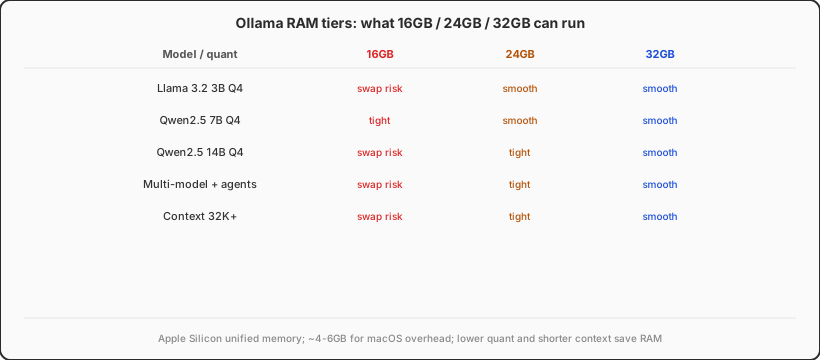
16GB can run Ollama—small models, short chats, fewer background apps—and feel fine. Concrete fits:
- Trying things out: 3B–7B Q4 models like
llama3.2:3b,qwen2.5:7b-instruct-q4_K_M - One-off Q&A, email drafts, short translation
- No agents, no multiple loaded models, context under ~16K
My classic pain scene: Chrome (20+ tabs), VS Code, Docker Desktop, plus an 8B model on 16GB—no crash, just “smooth death”, half a second per token. Kill Docker and half the tabs and speed returns instantly.
16GB bottom line: treat Ollama as a light assistant. Don’t expect stable 14B+, and don’t stack OpenClaw, vector DB, and browser automation locally. If your Gateway lives on a VPS and home Ollama is the upstream, 16GB works as a small-model host—see our OpenClaw + Ollama gateway troubleshooting guide.
24GB: the 2026 sweet spot for solo developers
If you pick one tier for long-term Ollama use, 24GB is what I recommend most often to individual developers. Practical reasons:
- 7B–8B can stay resident while the OS and IDE breathe—you’re not closing apps daily
- 14B Q4 is viable in many workflows; noticeably better than 7B for code and long summaries
- 8K–16K context keeps KV cache growth manageable
- Ollama plus a light vector DB or single Docker service—no forced either/or
24GB won’t magically run 70B on consumer hardware. Its value is balance between quality and cost: a Mac mini M4 24GB costs less than 32GB yet handles daily dev + local 8B/14B inference comfortably.
Easy to miss: Apple memory is soldered—no upgrades later. “I’ll buy 16GB and see” is a permanent mistake on Mac. 24GB is headroom for model inflation—2024’s default was 7B; in 2026 many people start at 14B. The extra 8GB is insurance.
32GB: agents, multiple models, “stop counting RAM”
Who is 32GB for? You treat local LLMs as infrastructure, not a weekend toy.
- Always-on OpenClaw, LangGraph, or similar stacks with Ollama as one upstream
- Multiple
ollama pullmodels (7B for code, 14B for writing, a small embed model) - Context often 32K+, or RAG with long documents in the prompt
- Full Docker Compose AI stacks—often tied to deploying AI apps with Docker
32GB still won’t make 70B fly, but it cuts the “close this, open that” tax. The slowest debugging I see isn’t wrong model config—it’s living on a memory cliff: works today, dies tomorrow because Notion and Slack joined the party.
Tight budget? Light inference on a 24GB box, heavy work on a cloud Mac or VPS. Same logic as renting a cloud Mac before committing to hardware—see Mac vs Windows when learning to code.
Decision table: ignore the marketing fluff
| Primary use | RAM tier | Why |
|---|---|---|
| Occasional local chat, learning Ollama CLI | 16GB (OK) | 3B–7B Q4; accept closing apps and short context |
| Daily dev + local 7B/8B coding assist | 24GB (recommended) | OS + IDE + model online together, stable feel |
| 14B models, longer docs, light RAG | 24GB (min) / 32GB (comfort) | 14B Q4 ~8–9GB; with cache, 16GB is tight |
| Agent stack + Docker + multiple models | 32GB | Many components; peaks and fragmentation add up |
| Full local 70B inference | Skip consumer tiers | Use cloud GPU or API; don’t brute-force RAM |
Five tuning moves (cheaper than upgrading RAM)
Before you buy more memory, try these—they bought me six extra months on 16GB:
- Pick quantization wisely: Q4_K_M or Q5 first, not FP16;
ollama show <model> --modelfileto see size. - Cap context: set
num_ctxin Modelfile or API calls—4K is often enough for chatbots, not default 32K. - One loaded model at a time:
ollama psthenollama stopwhat you don’t need. - Trim heavy background: Docker Desktop, Electron IM apps, Chrome tab hoarding—use Safari or one profile while inferring.
- Watch Memory Pressure, not just “used GB”: yellow/red pressure predicts stutter better than a raw number.
More knobs: Ollama Modelfile docs.
Three “blood and tears” stories I keep seeing
Story 1: “16GB is fine, I only run 7B.” — Added embed model + Open WebUI; three hungry processes; 25 tokens/s → 4; blamed Wi‑Fi.
Story 2: “I paid for 32GB, I’m invincible.” — Still FP16-ish quant, 32K context, Chrome wide open; 70B still swaps. Capacity doesn’t shrink the model.
Story 3: “My Windows box has 32GB, beats any 16GB Mac.” — Maybe with NVIDIA VRAM—but on Mac for Ollama, unified memory bandwidth and sharing often makes 16GB Mac run 7B more steadily than many 16GB iGPU laptops. Compare platforms, not sticker GB. Apple’s Apple Silicon unified memory path (e.g. MLX) matters too.
Wrap-up: choose without regret
Three quick questions:
- What model size do you actually run? Steady 7B/8B → 24GB; toy 3B → 16GB tolerable; 14B+ or stacks → 32GB.
- Will you close apps while inferring? If no → don’t buy 16GB.
- Can RAM be upgraded later? Not on Mac—undersizing is permanent; desktop Windows can add sticks, but Ollama + CUDA is another lane.
My take for 2026: serious Ollama as a dev copilot starts at 24GB for value; 32GB for agent people who refuse to micromanage memory; 16GB only for light experiments—with eyes open. Don’t worship “more RAM always wins,” but don’t underestimate KV cache and long context—the quiet memory monsters.
In one line: Ollama’s software bar is low; hardware hits unified memory first. Know your model tier and workflow before you order 16 / 24 / 32 GB—you’ll save money and many nights of screaming fans.
Stable local Ollama needs the right tier—cloud Mac too
Running Ollama well is about enough unified memory and bandwidth. Mac mini M4 in 24GB / 32GB configs handles local 7B–14B inference more calmly than cobbled-together boxes—quiet, low power, fine to leave on.
Don’t want a big hardware bet, or need a clean second machine for models and Xcode? VPSSpark cloud Mac subscriptions let you split tiers: light experiments locally, agents and build queues in the cloud.