
Getting OpenClaw 2.0 onto a Linux VPS is the easy part. A gateway that answers chat is not the same thing as a host you would leave alone for a week. The stock host install is conservative: loopback bind, pairing codes for unknown DMs, mention-gated groups. What still bites on day seven is the trio the installer does not tighten for you — sandbox off, session tools that can see the whole Gateway, and model API keys that may still sit in files the agent can read.
We ran one Ubuntu cloud box for seven days as a single-operator, remote-API, one-Telegram-channel duty host. Each day had one job: permissions, SSH and listeners, API keys, the browser, then agent isolation. The verdict: it is safe to keep running inside one trust domain. It is not a multi-tenant boundary. Official docs say that in the first screen. Size the box with yesterday’s OpenClaw 2.0 VPS CPU, RAM, and disk notes; this piece only asks which doors were still open after a week.
The short answer: safe, with a contract
OpenClaw treats one Gateway as one trust boundary — a single operator, or a small team that already trusts each other. Hostile users, separate customers, or separate business lines need their own Gateway and credentials, ideally their own OS user or host. That is the model in the OpenClaw Gateway security docs, not a blog flourish. Score it like multi-tenant SaaS and every default fails. Score it like “my own duty box” and most defaults hold.
We reran openclaw security audit every day. Day one was not a naked port — a host install stays on loopback, so 18789 never showed on a public scan. The loud findings were host-side tool exec and Gateway-wide session visibility. Leave those alone, then add a browser skill and a “read-only family” persona, and the blast radius jumps from “this VM” to “every transcript and secret on this VM.”
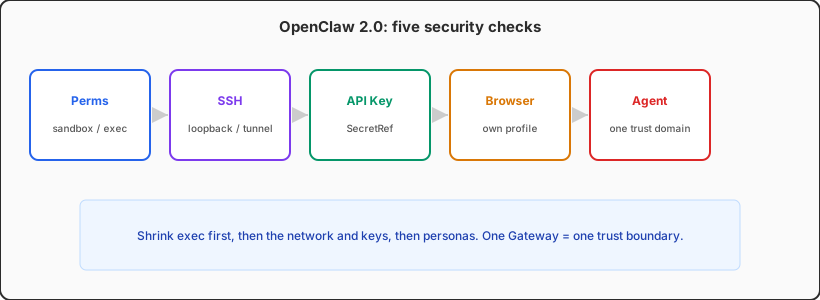
How we ran seven days without calling “no incident” a pass
The box was 2 vCPU / 8 GB Ubuntu 24.04, native install.sh, remote API, a systemd user unit. SSH keys only, password login off. The Gateway stayed on bind: loopback; we reached Control UI over an SSH local forward and never opened 18789 in the cloud security group. Telegram stayed on pairing. We left Docker sandbox off on purpose, so day seven would show the real default posture.
Three artifacts every morning: openclaw security audit --json, ss -lntp checked against the provider firewall, and a permission plus plaintext-key sweep under ~/.openclaw. We did not score “did a prompt injection succeed.” We scored config drift and files the agent (or we) left world-readable.
Check 1: permissions — exec still lands on the host
Sandboxing in OpenClaw 2.0 is optional. The Gateway always stays on the host; tools move into Docker or Podman only after you set agents.defaults.sandbox. With it off, host=auto resolves to the gateway machine. That is pleasant for a personal assistant you trust. For a duty bot that will see links, forwards, and attachments, it wires prompt injection to the deploy user’s shell.
Day-one audit kept two notes: a wide tool blast radius, and security="full" — the documented trusted-operator default, not a CVE. Our cut: the personal agent may keep host exec if pairing is on, filesystem tools stay workspace-only, and tools.elevated is off. A second agent that faces family or a public room must use sandbox.mode: "all", workspace ro or none, and deny exec, browser, gateway, and cron.
Directory modes drift faster than people expect. An scp from a laptop, a Docker volume, or the agent copying openclaw.json can turn 600/700 into 644/755. openclaw security audit --fix tightens state and config modes. It will not turn sandboxing on. Run the Gateway as its own Linux user so keys, the session store, and the workspace live in that home, not under ubuntu or root.
host=auto falls back to the host. An explicit host=sandbox with no runtime fails instead of silently returning to the host. Do not “fix the error” by flipping host back to auto and calling that isolation.
Check 2: SSH and bind — keep the control plane off the public net
Day two was an external scan. On the host-install path, 18789 listened on 127.0.0.1 only. The security group allowed 22. The scanner never saw the Gateway. That is the documented default for a regular host, and it was the calmest finding of the week. Container images are the other story: they default to an exposed bind and must ship with auth. Publishing Docker ports is not “as safe as a host install.”
For SSH we only required three things: no password login, no root password, and no antique key types. Remote Gateway access went through an SSH tunnel (or Tailscale), not “reverse-proxy Control UI to 443 and forget the token.” HTTP and WebSocket share one port, including Control UI and agent-authored widgets. Official guidance treats those widgets as untrusted content. Do not put them on the same origin as an already-logged-in admin app.
Published container ports skip host INPUT and ride Docker’s own forward chain. The security docs call out the DOCKER-USER chain. If you run a container, retest against the public IP, not ss inside the namespace. For the firewall versus loopback cut, use the Linux minimal-exposure SSH/HTTPS matrix, then come back here and ask whether anyone flipped the bind to 0.0.0.0 during the week.
Node pairing is an SSH surface too. sshVerify reads device identity back over operator SSH; reachability alone does not approve. autoApproveCidrs is off by default and only covers a first-time, scopeless node role. We left both defaults alone. Convenience is not a reason to auto-approve a second machine.
Check 3: API keys — plaintext on disk is still agent-readable
Day three was a secret sweep. OpenClaw 2.0 has SecretRefs: provider apiKey fields, the Gateway token, and some channel credentials can resolve from env, file, exec, or store. Plaintext still works. SecretRefs are opt-in per field. “We upgraded to 2.0” does not mean “keys left the disk.”
The risk is not “a key exists on the duty host.” The risk is a key sitting where read or exec can open it: openclaw.json, .env, generated agents/*/agent/models.json, retired auth-profile archives. Prompt injection does not need to break SSH if the model will “read the config and paste it into chat.” The OpenClaw secrets guide treats migration as done only when supported fields are SecretRefs, old plaintext is scrubbed, and openclaw secrets audit --check is clean. Credentials that cannot use SecretRef still need an OS user, a container, or an external proxy.
Treat the Gateway token as its own class. A shared secret that can call /v1/chat/completions, /tools/invoke, or admin RPC is a full operator credential. Do not drop it in the agent workspace, a skill repo, or a second bot “for convenience.” Rotation is short: mint a new token, restart, update clients, prove the old value dies. We moved model keys to env SecretRefs and kept the Gateway token in a deploy-user-only env file. No sk- lines remained in the workspace.
openclaw.json.bak copies, packed workspaces, and sync-folder clones still need to leave the agent’s listable tree — or be deleted.
Check 4: the browser — you are handing the operator’s hands to the model
Day four we enabled a browser skill and turned it off the same day. Not because Chromium blew RAM — 8 GB can survive one pass — but because remote browser control is documented as equivalent to operator access. The agent inherits that profile’s logins, cookies, and saved passwords. Your daily Chrome profile is not a tool.
Isolation is layered: a dedicated profile, password manager and sync off, a separate download directory treated as untrusted, control ports only on loopback or a tailnet, never Funnel. OpenClaw 2.0 can run a sandboxed browser in its own container on openclaw-sandbox-browser, with allowHostControl off. SSRF stays strict; private destinations stay blocked unless you set dangerouslyAllowPrivateNetwork. We left that off.
Extension relays and remote CDP are “if you can see the tab, you are that person.” Existing-session mode is not safer; it is more like you. A node on a desktop machine is admin after pairing. Keep Gateway and node on the same private network. Week’s rule: text assistants do not need a browser. If you must, give it a profile with no personal accounts, and do not share RAM with a local 7B model.
Check 5: agent isolation — defaults are not tenants
Days five and six we added a second, read-only agent and assumed sessions would split. They did not. Default tools.sessions.visibility is all; tools.agentToAgent.enabled is true. An unsandboxed agent can list, search, and read other agents’ sessions, including the persona you thought was “family read-only.” Sandboxed callers stay on their spawn tree, but that does not hide their transcripts from an unsandboxed main agent.
Persona separation on one Gateway means visibility agent or self, agent-to-agent off or allowlisted, and no scope: "shared" sandbox. If more than one person can DM the bot, set session.dmScope to per-channel-peer or every DM rolls into the main session. These are collaboration rails, not hostile-tenant walls. Customer A and customer B need two Gateways.
Control-plane tools need the same haircut. gateway can read config (topology and secret hints). cron can keep running after you log off. Any agent that will see untrusted content should deny both, plus sessions_spawn and sessions_send. Treat plugins and skill trees as trusted code: pin sources, use plugins.allow, restart after changes.
Day 7: what drifted, what did not
The last pass: bind still loopback, pairing still pairing, nobody had opened 18789 on the security group. What drifted was a debug .env copy in the workspace and a commented allowHostControl leftover from the browser trial — close to landing in the “production” file on merge. After --fix, file modes were clean. With sandbox still off on the main agent, the audit still labels the posture as trusted-operator, not multi-user.
| Check | Day 1 | Day 7 | Change it? |
|---|---|---|---|
| Permissions / sandbox | Sandbox off, exec on host | Main agent on host; read-only agent sandboxed | Sandbox anything that sees untrusted input |
| SSH / bind | Loopback + SSH 22 only | No drift | Keep; retest published container ports |
| API keys | Plaintext in openclaw.json | SecretRefs; no sk- in workspace | Required, including backups |
| Browser | Off | Dedicated profile, then off | Default off; dedicated profile if on |
| Agent isolation | visibility=all | visibility=agent, A2A off | Change the day a second persona appears |
Read the table as a decision: OpenClaw 2.0 can stay up for a week or a year on a VPS if you accept one Gateway as one trust domain and rerun the audit before a second persona, a browser, or a public reverse proxy. You do not need a new feature. You need the default “I trust the operator” story to match the threat you actually have.
Close it out: a scene-by-scene list
Do not chase “enterprise zero trust” in one sitting. Write the conditions that must all be true for the workload you will ship tonight. When they fight, split machines. Extra exceptions in one config are more expensive than a second box.
| Scene | Minimum | Better | Do not |
|---|---|---|---|
| Personal text assistant | Loopback + pairing + mode 600 keys | SecretRefs and workspace-only files | Bind 0.0.0.0 with no token |
| Family or teammates on one box | per-channel-peer + visibility agent | Sandboxed read-only persona, A2A off | Shared main session or shared browser profile |
| Browser skill required | Dedicated profile + private control plane | Sandboxed browser container, default SSRF | Personal Chrome or a public Funnel |
| Separate customers or lines | Separate Gateway + credentials | Separate OS user or VPS | Pretend RBAC is tenant isolation |
Two ops chores are security chores: tokens in logs, and plugins loaded from a source you did not review. Turn on redaction and rotate; pin plugins.allow. Then decide whether the Linux duty box should keep holding operator keys, or whether those keys belong on a quieter control plane.
FAQ
Text-only, stock defaults — will a public scan see the Gateway?
A host install on loopback will not show 18789 on the public internet. Lock pairing first. A stranger who can already DM you is the real first hop, not nmap.
Is Docker automatically safer?
Images help rollback and filesystem isolation. Official containers default to an exposed bind, and published ports bypass host INPUT. Without auth and an external retest, Docker is usually riskier, not safer.
Does audit --fix replace hand edits?
No. It flips open group policies back to allowlists and resets 600/700 modes. It will not enable sandboxing, migrate SecretRefs, or narrow session visibility.
Can the model read the API key itself?
If plaintext still sits on an agent-readable path, file tools or exec can open it. SecretRefs shrink disk residue. They are not process isolation. Do not combine untrusted content with host exec.
Mint keys on a cloud Mac; leave the gateway on Linux
A Linux VPS is the right place for a standing OpenClaw Gateway: standard images, boring systemd, cheap always-on. It is the wrong place to pile SSH private keys, the primary model secret, and a personal browser profile next to a workspace the agent has already written to. Apple Silicon idles around 4W. Gatekeeper, SIP, and FileVault keep the malware surface small, and crash rates stay below a same-price Linux box that runs Docker all week. That is an operator-side duty machine: mint keys, run the tunnel client, do the rare desktop check.
The split that held up after seven days: Linux owns the Gateway and the remote API. A cloud Mac mini owns credentials you will never hand the agent, plus the macOS toolchain. Homebrew, SSH, and Docker are ready on day one, and you do not invent a new permission model just to add one browser skill.
If the five checklists are closed, the next machine should not share the agent’s trust domain — VPSSpark cloud Mac mini M4 is that slot. See the plans and add a weekly control node instead of leaving every secret on the same VPS you just audited.