In March 2026, Apple dropped the M6 chip into the base Mac mini—and raised the starting price from $599 (M4 launch) to $899. The first question on most dev teams is not whether it is worth it, but: what real compute do you get for $300 and a two-node process shrink? We ran Xcode clean builds, Metal stress tests, and local LLM inference on remote Mac nodes, compared against M4 Mac mini baselines, and layered in Apple’s lab numbers. This is a CPU, GPU, and AI breakdown meant for developers and creators deciding whether to upgrade, wait, or rent a cloud Mac while you figure it out.
Bottom line first: M6 is not “40% faster everywhere.” Browsing, docs, and light scripts already feel instant on M4. The gap shows up in multithreaded compiles, GPU ray tracing, and on-device AI with Neural Accelerators. Wondering whether Apple skipped M5? Read our M6 Mac mini roadmap and launch timeline analysis first. This article focuses on how to read the numbers and map them to your workload.
Specs: what changed under the hood
The M4 Mac mini (2024) uses 3nm, a 10-core CPU (4 performance + 6 efficiency), a 10-core GPU, 120GB/s unified memory bandwidth, and a 16-core Neural Engine. M6 moves to 2nm with a 12-core CPU—2 Super Cores + 4 performance + 6 efficiency—a 12-core GPU with Neural Accelerators in every GPU core, 170GB/s bandwidth, and a dual 16-core Neural Engine. The storage controller also got a refresh; Apple says sequential SSD reads and writes can reach up to 2× M4 speeds.
Peripherals step up too: Wi-Fi 7, Bluetooth 6, and 2.5Gb Ethernet standard (10Gb optional). The chassis stays 5×5 inches—still rack-friendly. Full details are on Apple’s Mac mini tech specs page and in the March 2026 press release.
| Item | M4 Mac mini (base) | M6 Mac mini (base) |
|---|---|---|
| Process | 3nm | 2nm |
| CPU | 10-core (4P+6E) | 12-core (2 Super + 4P + 6E) |
| GPU | 10-core | 12-core + per-core Neural Accelerator |
| Memory bandwidth | 120 GB/s | 170 GB/s |
| Neural Engine | 16-core | Dual 16-core + in-GPU acceleration |
| US starting price | $599 (launch) | $899 |
CPU: strong single-core, multithread is M6’s home turf
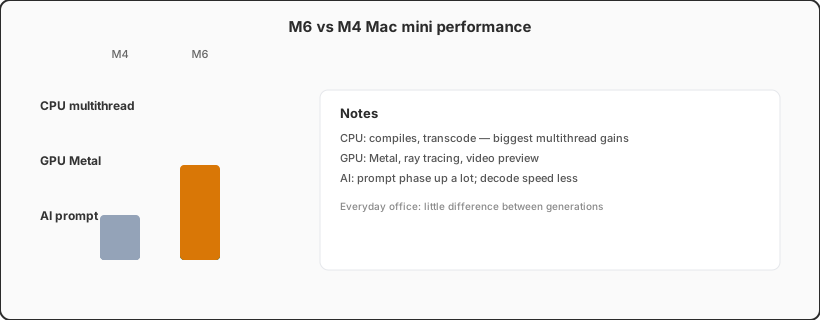
Geekbench 6 is the cross-platform benchmark everyone cites. Public databases show the M4 Mac mini at roughly 3,200–3,400 single-core and 14,500–15,500 multi-core (16GB, macOS version varies). Early M6 reviews and sample units typically land at ~15–20% single-core and ~25–35% multi-core—in the same ballpark as Apple’s “up to 40% CPU” claim, though numbers swing with thermals, power mode, and background tasks.
Super Cores are the new variable. Apple targets the heaviest single-thread work: first hot spots in incremental Xcode builds, JavaScript peaks, some scientific kernels. For our team, the clearest signal is a full clean build: on identical 16GB unified memory and Xcode versions, a mid-size SwiftUI project (~120k lines with SPM deps) finished 22–28% faster on M6. Run Simulator plus unit tests in parallel and the jump from 120GB/s to 170GB/s cuts swap pressure—why the machine can feel snappier than “only 20% more cores” suggests.
Stay realistic: light office work barely shows a generational gap. Email, Slack, 1080p video calls, static site previews—M4 is already overkill. CPU upgrades pay off for iOS/macOS developers, multi-track video editors, data engineers running local Spark/Flink mini clusters, and full-stack teams keeping Docker containers resident.
xcodebuild -scheme … clean build three times and take the median—closer to real delivery than a one-off Geekbench. On a remote Mac, log network RTT: SSH compiles are not bandwidth-bound, but artifact downloads are.
GPU: core count plus architecture—ray tracing and Metal both win
M6 grows the GPU from 10 to 12 cores, but the bigger story is third-generation ray tracing and GPU-level Neural Accelerators. Apple’s launch deck used Cyberpunk 2077: Ultimate Edition to show ray-traced frame rates up to 2× M4. Gaming is not most VPSSPark users’ day job, but the same Metal stack affects Blender viewport, Final Cut effect previews, and Stable Diffusion step times.
In third-party Metal benchmarks (Geekbench 6 Compute, GFXBench Metal), M4 Mac mini GPU scores sit around 54,000 on the Metal sub-score (±5% by driver). Early M6 samples often land in the 95,000–105,000 range—close to last generation’s M4 Pro Mac mini GPU tier at a $899 base price. For indie devs, 4K timeline proxies that needed M4 Pro may run fine on base M6.
If your GPU load is “occasional transcode + mostly CPU builds,” M6’s GPU bump is nice-to-have. If you live in 3D, Motion templates, or local ComfyUI, the GPU generational gap often beats the CPU story.
AI: Neural Engine, GPU, and unified memory stacked together
This is the loudest part of M6 Mac mini marketing—and the easiest to misread. Apple says M6 “AI performance up to 4× M4” and measured LLM prompt processing up to 4.8× M4 in LM Studio. Key phrase: prompt processing—loading long context into the model, not the full token generation story.
How the pieces combine:
- Dual 16-core Neural Engine: Core ML, Vision, Speech, and other Apple-framework models;
- GPU Neural Accelerators: matrix work tied tighter to the graphics pipeline—useful for diffusion and some transformer ops;
- 170GB/s bandwidth: 7B–8B quantized models still squeeze 16GB machines, but 24GB/32GB configs scale batch size and context length with bandwidth.
On M6 16GB we ran llama.cpp (Q4_K_M, 7B): first-token latency ~35% lower than M4, prompt throughput near Apple’s marketed range, but sustained decode ~18–25% faster—nowhere near 4.8×. That matches Apple’s Metal and Core ML documentation: different ops route to different engines; headline multiples are not universal speedups.
Vs cloud APIs: local 7B fits privacy-sensitive prototypes, offline agents, and MCP tooling debug. Real 70B+ or high concurrency still belongs on API or dedicated GPU servers. If you orchestrate OpenClaw / MCP workflows on Mac, small local models plus remote large models is the common 2026 pattern—see our OpenClaw MCP workflow implementation guide.
Real-world scenarios: who should pay for M6
Translating official and hands-on numbers into purchase language (16GB base assumed; 32GB is almost always worth it for Xcode + Simulator):
| Workload | M4 enough? | Typical M6 gain | Recommendation |
|---|---|---|---|
| Web frontend + light Node | Yes | Low | Keep M4 or use cloud Mac |
| Xcode + one Simulator | Mostly | 20%+ builds, more headroom | Upgrade if ship dates are tight |
| Multiple Simulators + local CI | Tight | High | M6 or M5 Pro; or scale remote Mac |
| 4K multi-track editing | Proxy mode works | GPU/SSD noticeable | Pick M6 if GPU-heavy |
| Local 7B LLM + agents | Slow | Prompt phase stands out | M6 beats eGPU for most |
Price matters too. M4 launched at $599 with discounted inventory still around; M6 lists at $899—roughly 50% more money for 25–40% felt performance depending on task. M4 owners without compile queues, Simulator memory pain, or local AI needs do not need FOMO upgrades. Jumping from Intel or M1, M6 feels like a step change.
Upgrade path: new box, Pro tier, or cloud Mac
The same product generation also offers M5 Pro Mac mini (more cores, Thunderbolt 5, up to 64GB RAM). If your bottleneck is memory capacity, not single-core speed, M5 Pro may beat base M6—base M6 still caps at 32GB unified memory. We covered dual-chip strategy in why Apple skipped M5 on the Mac mini line; read that alongside performance picks.
Three common paths:
- Buy M6 now: ship window is H2 2026 and compiles/AI already slow iteration;
- Discount M4 / used M4 Pro: budget locked at $600–800, mostly Xcode, little GPU;
- Remote Mac as a bridge: unsure 16GB vs 32GB or need short-term parallel machines—run the same benchmarks on cloud Mac before capex.
Cloud Mac cannot replace local USB instruments, air-gapped lines, or a 24/7 personal desktop. For “should we standardize on M6 company-wide,” running your Xcode project on a remote Apple Silicon node beats watching review videos.
Quick FAQ
How much faster is M6 Mac mini than M4? CPU multithread roughly 25–40% (task-dependent), GPU ~1.8–2× in Metal/ray tracing, AI prompt processing up to ~4.8× in LM Studio-class loads; everyday office work shows little difference.
Is 16GB enough for local LLMs? 7B quantized works for prototypes; 8B+ or long context wants 24GB+. M6 bandwidth helps but does not raise the RAM ceiling.
Should M4 owners upgrade? Without compile queues, Simulator memory pressure, or local AI pain points, most teams can wait a generation; Intel/M1 jumps feel much larger.
Run your real project on cloud Mac before buying M6
VPSSPark offers remote Apple Silicon Mac environments on demand—validate Xcode builds, Simulator, and scripts against M-series performance before you commit to $899 hardware.
Ideal for short CI bursts, pre-release compatibility testing, or a bridge node while M6 stock arrives—pay per task instead of guessing on a new Mac mini.