The usual failure when you put OpenClaw 2.0 on a Linux cloud server is not a broken installer. It is buying the cheapest SKU that still accepts SSH. The Gateway starts, then a channel or a skill lands, and available RAM disappears. We ran native install, Docker, a remote API, and a local model across typical Ubuntu VPS sizes and logged CPU, RAM, and disk so you order for the workload, not for “the box came up.”
The short answer: for a remote-API text channel, 2 vCPU / 8 GB / 40 GB is the daily starting point. 2 vCPU / 4 GB will boot, but do not add browser skills or an on-box image build. If the same host must run a 7B local model, budget 16 GB of RAM. Official docs treat the gateway as a self-hosted, multi-channel agent on a machine you own — headroom matters more than the lowest number on a marketing table.
Buy the workload, not the lowest price
The OpenClaw 2.0 process is light. An idle Gateway sits around a few hundred MB and barely moves the CPU. What kills a small VPS is three things stacked: first-boot sandbox compile, building a Docker image on the same host, and local inference. The OpenClaw Docker install docs are blunt: a local source image build wants at least 6 GB RAM. Switching to the pre-built ghcr.io/openclaw/openclaw image skips that spike.
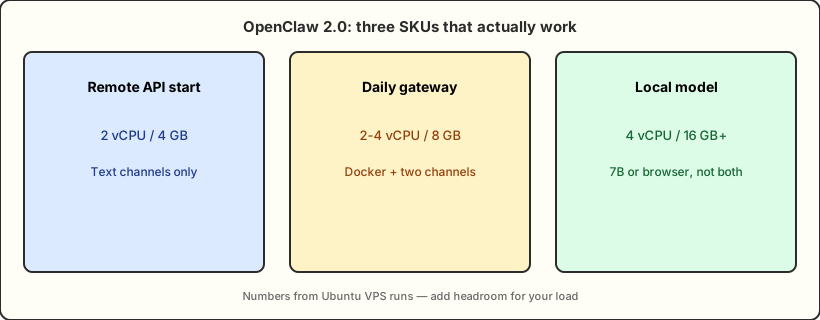
So the same OpenClaw 2.0 stack on 4 GB versus 16 GB is not “a bit slower.” It is “stays up” versus “does real work.” The diagram below is the three-tier cut we use for purchasing.
How we kept the lab honest
We used one Ubuntu cloud image and changed only CPU, RAM, and disk so hardware generation did not leak into the OpenClaw numbers. After first boot: apt update && apt upgrade, then Node (official recommendation is Node 26, or Node 24.16+), Git, and Docker Compose v2. SSH was key-only. If you cannot even get a shell, fix security groups and sshd first — the same class of problem as the WWDC-week fork between API spend and on-device inference in The WWDC Midnight Fork: API Bills Spike, On-Device AI Goes Free.
Each SKU got four readings: OS idle, Gateway idle, steady state after one Telegram channel, and the peak after a tool-calling message. Disk covered the Ubuntu root volume, Docker layers, and ~/.openclaw. We kept the median of three runs, not the lucky pass that did not OOM.
available from free -h, not inflated VIRT. CPU is a 60-second average, not a one-core spike. Disk excludes the swap file itself.
What Ubuntu and Docker actually consume
Ubuntu 22.04 and 24.04 both run OpenClaw 2.0. 24.04 idles about 100–200 MB heavier and buys a newer kernel plus a longer LTS window. 22.04 still wins on the number of troubleshooting posts. Neither should grow a desktop session — a GUI on a cloud box steals the gigabyte you thought you left for the gateway.
Docker has two bills. The engine idles around 150–250 MB. The image is another 1–2 GB on disk for slim, more for the Chromium -browser variant. Native curl -fsSL https://openclaw.ai/install.sh | bash is leaner at idle, but you own rollback. On a 4 GB box we only recommend native install plus a remote API. If you want Docker, pull the pre-built image. Do not docker build there.
Install Docker Engine from the vendor repo, not the distro’s stale package. Follow the official Docker Ubuntu install guide and confirm you have the docker compose plugin, not the old docker-compose binary. OpenClaw’s Compose flow assumes v2.
| Install path | Idle RAM | Disk delta | Who it fits |
|---|---|---|---|
| Native install.sh | ~250–400 MB | ~0.4–0.8 GB | 4 GB trial, lowest overhead |
| Docker pre-built image | ~450–700 MB | ~2–4 GB | 8 GB daily, isolation and rollback |
| Build the image on-box | Peak ≥ 6 GB | Build cache extra | 8 GB+ hosts or CI only |
Four SKUs: CPU, RAM, and disk
This table is the core of the OpenClaw 2.0 VPS benchmark. CPU answers “can it schedule,” RAM answers “will it OOM,” disk answers “can logs survive the first month.” All rows are remote API, one channel, no local model.
| SKU | CPU | RAM | Disk | Call |
|---|---|---|---|---|
| 2C2G / 25 GB | Schedules, jitters under concurrency | available stays under 300 MB | Almost gone after install | Skip; Docker builds OOM |
| 2C4G / 40 GB | Fine for one channel | ~2.1–2.6 GB used at steady state | 40 GB is just enough | Text-only; no browser skill |
| 2C8G / 80 GB | Still calm with two channels | 3 GB+ available left over | 80 GB is comfortable | Daily pick for a remote API |
| 4C16G / 160 GB | Tool-call peaks do not queue | Room for 7B or a browser, not both | Count model files separately | Buy this only if you infer locally |
2C2G fails the same way every time: the Gateway comes up, available RAM drops to a couple hundred MB, then Docker or onboard trips the OOM killer. Exit 137, almost no application error. 4 GB lives if you disable browser skills, skip on-box builds, and rotate logs. 8 GB is the first size that still has room for a second channel. 16 GB is not about faster chat — it is the ticket to talk about local models.
Disk fills faster than people expect. Ubuntu after updates is 8–12 GB; Docker images 2–6 GB; workspace and logs 1–5 GB a month. Official docs only say “leave room for images and logs.” For operations we write: 40 GB without local weights, 80 GB for daily use, plus 10–20 GB if models live on the box. A 2–4 GB swap file is insurance, not a RAM plan — once you swap, tool-call tail latency gets ugly.
Local model vs remote API: the monthly math
A remote API takes inference off the VPS. The box only runs the Gateway, channels, and tools. That is the cheapest hardware path, and the OpenClaw docs assume you bring a provider key. You pay per token, and context leaves the machine.
A local model turns that invoice into RAM. A quantized 7B weight is about 4–5 GB; add the runtime and KV cache and 16 GB is the first size that can share the host with the Gateway. 14B wants 32 GB. If you already route models through a personal gateway on a cloud Mac, the pattern in Cloud Mac + OpenRouter Hands-On: Build Your Personal Enterprise AI Gateway is the same idea with a different control plane.
Rough monthly USD on typical 2026 Linux VPS list prices, traffic overage excluded:
| Setup | Box rent | Model bill | Ballpark total | Fits |
|---|---|---|---|---|
| 2C8G + remote API | ~10–18 | Light 15–40, heavier if busy | 25–60 | Personal assistant, low-sensitivity context |
| 4C16G + local 7B | ~20–40 | 0 | 20–40 | High daily volume, data stays on-box |
| 8C32G + local 14B | ~40–80 | 0 | 40–80 | Closer to a mid-size cloud model |
“Local is cheaper” is only true sometimes. A few hundred short chats a month often cost less on a remote API than the jump from 8 GB to 16 GB. You also give up quality, tool-following, and long context. Flip the story for busy Cron, hundreds of channel messages a day, or logs that cannot leave the network: 16 GB plus 7B pays for itself and keeps the text home.
The hybrid we prefer: keep the primary model remote, send titles and short summaries to a utility model — or occasionally to a local 7B. Do not run a browser skill and a local 14B on the same 8 GB host. The RAM ledger will not close.
One decision table for the order form
Write the capabilities that must be true at the same time, then buy. If two capabilities fight, two smaller boxes beat one machine that tries to browse and run 14B.
| You need | Bare minimum that boots | What we would order | Do not |
|---|---|---|---|
| Telegram / Discord text assistant | 2C4G native install | 2C8G + pre-built Docker | On-box image builds, a desktop |
| Plus a browser skill | 4C8G | 4C8G or 4C16G | Share the host with local 14B |
| On-box 7B inference | 4C16G | 4C16G NVMe 80 GB+ | Force it onto 8 GB |
| Team channels + audit logs | 4C8G | 4C8G / 80–160 GB | Skip log rotation |
Two non-spec mistakes still look like “not enough RAM”: binding the Gateway to 0.0.0.0 with no reverse proxy, and filling the disk with logs. Bind 127.0.0.1 and put Nginx or Caddy in front. Cap Docker and journald. After the SKU is right, those two items decide whether you get paged next week to grow the volume.
FAQ
Can I try 1C1G or 2C2G?
Only to prove the installer finishes. The Gateway will jitter as soon as a channel connects, and a Docker build almost always exits 137. Trial on 4 GB; stay on 8 GB if you plan to keep it.
Does it have to be Ubuntu? Will Debian work?
Debian 12 works, and Docker documents it. We used Ubuntu because images and write-ups line up. Do not put a non-LTS desktop image in production.
Is CPU the bottleneck, or RAM?
On a remote API, almost always RAM and disk. CPU only leads when you infer locally, render a browser, or build an image. Four vCPU is luxury for a text gateway and a requirement for 14B.
SSD or NVMe?
A remote API barely notices. Local model loads and Docker layer extract feel NVMe. 80 GB of NVMe beats 160 GB of slow disk if you rotate logs.
Keep the gateway on Linux; put the control plane on a cloud Mac mini
A Linux VPS is the right home for a standing OpenClaw Gateway: cheap, standard images, endless Docker notes. When the same workflow also needs Safari checks, Xcode signing, or a low-power box that should not crash, stacking more onto the Linux host that already runs Docker and logs will bounce you back to the RAM ledger. Apple Silicon unified memory, idle power around 4 W, and macOS that stays up unattended are a different axis from “buy a 32 GB Linux SKU.”
The split that holds: Linux runs the gateway and the remote API; a cloud Mac mini runs anything that needs native macOS. Homebrew, Docker, and SSH are ready on day one, and you do not steal RAM from Ollama just to add one more browser skill.
Once this article has fixed your Linux SKU, leave the team a control node that does not fight inference for memory — that is the job of a VPSSpark cloud Mac mini M4. See the plans and add one by the week or the month. Debugging two roles on two machines beats stuffing every process onto one VPS.