The week before the Phone 18 keynote, nobody in the war room was arguing camera focal lengths—every eye was on a wall of red Actions runs. Xcode 27, the iOS 27 SDK, GitHub’s hosted xcode-27 labels, plus a handful of freshly hung Apple Silicon self-hosted runners: four failure modes stacked into one launch window. Drift any one of them and App Store screenshots and TestFlight betas stall together. We re-ran the whole iOS CI/CD path from “occasionally green” to “survives launch week,” and logged the real pile-ups here.
The calendar is blunt too. On September 10, 2026, GitHub’s Changelog stated that the Xcode 27 runner image now runs on macOS 27—labels stay xcode-27 / xcode-27-xlarge, and the image is arm64-only. Jobs that “happened to pass” on a macOS 26 base the day before can flip overnight when the OS version, simulator device names, or disk headroom change under you. For Golden Gate GA timing and machine cuts, start with our macOS 27 Golden Gate release date and supported Macs; this piece only covers how CI trips—and how we tightened the straps.
Why you re-run the whole lane before launch—not just bump a matrix cell
Muscle memory on most teams is: flip xcode-version from 26 to 27, then swap the destination to iPhone 18. In the Phone 18 window that almost always blows up, for three layered reasons. First, the SDK and the runner image do not ship in lockstep—your laptop may already have Xcode 27 GM while hosted images are still on public preview, or just flipped from a macOS 26 base to 27. Second, the simulator catalog moves: an iOS 27 runtime may not list the marketing device name you hardcoded, and name=iPhone 18 dies with Unable to find a device matching the provided destination. Third, if DerivedData, SwiftPM, or CocoaPods cache keys still encode “whatever came before this Xcode major,” a cache hit feeds yesterday’s build debris to today’s compiler.
We split acceptance into “it compiles” versus “launch week can absorb the load.” The first is a green PR job; the second is concurrency, disk, signing, and cold Simulator boots colliding at the same peak. On the hosted side, read GitHub’s about GitHub-hosted runners; on self-hosted, split PR fast-feedback and Archive heavy work by label—the same decision tree as in new ways to stop GitHub Actions from choking iOS / Xcode CI, only this time the trigger is the Phone 18 launch window.
Trap 1: still on macos-latest—or treating xcode-27 as “any Mac will do”
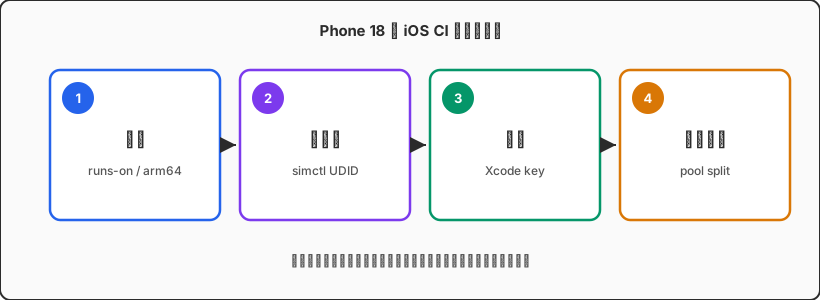
macos-latest in fall 2026 is still fine for “something that usually runs,” but it is a poor sole acceptance surface for Phone 18 launch week. It follows GitHub’s current default image policy; it does not mean “iOS 27 SDK plus the Simulator you need are already there.” To pin Xcode 27, write runs-on: xcode-27 explicitly (consider xcode-27-xlarge for heavy jobs)—do not expect maxim-lobanov/setup-xcode to rescue a mismatched base image. If the runtime is missing, selecting Xcode.app will not save simctl.
The quieter footgun: the Changelog stresses the image is arm64-only. If your org still has Intel self-hosted nodes—or someone wrote runs-on: [self-hosted, macOS] as if every Mac can take an Xcode 27 job—expanding the matrix produces flaky green/red: green when you land on Apple Silicon, red when an Intel box cannot install or run the toolchain. Labels must name the set you actually prepared, e.g. [self-hosted, macOS, ARM64, xcode27], and strip unupgraded nodes from that label.
xcode-27 versus a macos-26 compatibility lane belongs in the Runbook, and you reconcile it weekly against the Actions Runners page.
Trap 2: destination hardcodes iPhone 18 while the image has no such “phone”
Marketing’s Phone 18 and the Simulator device list are not the same table. In GitHub’s actions/runner-images notes, the iOS 27.0 runtime currently lists iPhone 17-series devices, iPhone Air, assorted iPads, and so on—it does not guarantee a simulator literally named iPhone 18 on keynote day. YAML like -destination 'platform=iOS Simulator,name=iPhone 18,OS=27.0' is the most common self-inflicted wound before launch.
What we can reproduce: at job start, parse xcrun simctl list devices available -j, pick a device under the iOS 27 runtime whose name starts with iPhone, write the UDID to $GITHUB_OUTPUT, and run later xcodebuild test with id=… only. For multi-device matrices, intersect “available list ∩ your whitelist”; missing devices skip with an alert instead of reddening the whole Release lane. UI tests also need a reality check: first cold boot of a new OS Simulator can eat several extra minutes—keep a 20-minute timeout from the Xcode 26 era and intermittent failures become permanent.
| Pattern | Launch-week risk | Steadier alternative |
|---|---|---|
name=iPhone 18,OS=27.0 | Fails if the name is not in the catalog | Select by UDID dynamically |
Hardcoded OS=27.0 minor | Image may ship 27.0.1 | Match runtime prefix or newest available |
macos-latest only | SDK / Simulator uncertain | Explicit xcode-27 acceptance lane |
| Intel + Apple Silicon shared labels | Same job fails by architecture | Split pools; 27 lane ARM64 only |
Trap 3: cache keys never invalidated for Xcode 27—green is the old world
During a major bump, the most convincing “we fixed it” illusion is cache. SwiftPM’s SourcePackages, CocoaPods’ Pods, homemade DerivedData tarballs—if the key only carries branch name or lockfile hash and omits $(xcodebuild -version) / image version, Actions cheerfully restores Xcode 26-era artifacts. Symptoms wander: missing symbols at link time, a crashed Swift driver, or tests that compile while module-cache validation fails.
We force three segments into every cache key: Xcode short version, runner image version (pin from env or docs on hosted), and Package.resolved / Podfile.lock. On upgrade day we change the old key prefix outright—better an 8–12 minute cold start than launch-week debugging of “same commit green locally, red in CI.” Self-hosted Apple Silicon nodes need extra care: shared DerivedData across jobs without Xcode-version directories mixes preview and GM intermediates into one stew.
Trap 4: you have Apple Silicon runners—disk and queues yank you back
Xcode 27 + the iOS 27 runtime + multiple Simulators is a disk killer. Hosted xcode-27 images are already heavy; a self-hosted Mac mini still carrying Xcode 26, two betas, and DerivedData for three apps often hits No space left on device mid-Archive. Before launch week we set hard node rules: one “current acceptance” Xcode only, whitelist Simulator runtimes, scrub DerivedData per job, and nightly cron for df -h plus xcrun simctl delete unavailable.
Queues do not vanish because you bought Silicon. When the whole company expands the matrix from “one SDK” to “26 compatibility + 27 acceptance” before the keynote, hosted concurrency and self-hosted slots fill at once. PR fast-feedback and TestFlight Archive must use different labels: the former aims for minutes; the latter may queue but must not block the former. Who steals slots at peak is a label-design problem—not whatever M-series badge is on the machine poster.
Treat Apple’s Xcode documentation as the source of truth for toolchain behavior; for which Simulators an image actually ships, trust that week’s runner-images Readme—not a blog screenshot from last year.
Launch-week runbook: how we actually cut over
Day one: move production PR acceptance jobs explicitly onto xcode-27, keep one macos-26 (or your last supported generation) as a compatibility sentinel—policy is “27 red blocks merge; 26 red alerts only.” Day two: every test destination becomes a dynamic UDID; delete marketing phone names from YAML. Day three: invalidate cache prefixes, force one cold build, record wall time as the launch-week baseline. Day four: split the self-hosted pool by label—ci-pr vs ci-release—and confirm no Intel node still wears a 27 tag.
On-call daily trio: check Changelog / runner-images for another image push, check runner disk watermarks, check whether queued-to-run ratios have slid back to “yellow longer than green.” When numbers worsen, cut matrix parallelism first—then talk about buying machines. More machines without better labels just make the wrong jobs fail faster.
xcode-27 queue time already exceeds compile time—or you need a pinned GM image for notarization and upload—renting an Apple Silicon cloud Mac by the day as self-hosted often beats gambling on a shared queue. Dedicated nodes fit Release and the cert chain; leave high-volume PR concurrency on hosted preview images as the first gate.
FAQ
Do we have to move every job to xcode-27 immediately?
No. Pin launch acceptance and store builds on 27; keep older-OS compatibility and hotfixes on the previous image for a while. What matters is clear labels and branch-protection rules so “any green Mac” never becomes merge policy.
Local Xcode 27 is green—why is CI still red?
Check three things first: is the runner really an arm64 xcode-27 image, does the simulator device name exist there, and did cache restore stale DerivedData. Your laptop has a full runtime; the hosted image might not.
Can self-hosted and GitHub-hosted mix in one workflow?
Yes—but as separate jobs with separate labels. Never let one runs-on array match both hosted runners and arbitrary self-hosted machines, or scheduling becomes unreproducible.
Can Phone 18 device testing replace Simulator CI?
No. Devices own camera, cellular, and performance feel; CI owns every-PR compile, unit tests, and regression. Launch week needs both—just do not make a physical phone the only merge gate.
Phone 18 window · Xcode 27 on-call
Need Apple Silicon that isn’t held hostage by a shared queue?
Pin Release and notarization on a dedicated cloud Mac; keep PRs on hosted xcode-27. Validate the image and cert chain by the day—calmer than fighting for concurrency on keynote morning.