If you've recently started learning to code, deploying websites, or experimenting with AI development tools, you may have noticed something odd: almost every tutorial tells you to get a VPS first.
Whether you're deploying a personal blog, running Docker, standing up an API service, or keeping an AI Agent, GitHub Runner, or Webhook online around the clock, the advice always circles back to the same thing: "Rent a VPS."
So what is a VPS, exactly? Why do developers almost all have one? And does it really matter that much?
This article explains it in plain language—with as little jargon as possible—whether you're hearing about VPS for the first time or already thinking about buying your first one.
In one sentence: a VPS is your remotely rented "dedicated mini data center"
VPS stands for Virtual Private Server. You can think of it as:
In a data center, there's a physical server. The provider uses virtualization to slice it into multiple parts, and one complete slice is leased to you—with its own operating system, its own IP address, and its own root access. It works like a small machine in your own server room, except it's remote and you operate it over SSH.
Here's how it relates to common product categories:
| Product type | Typical traits | Best for |
|---|---|---|
| Shared hosting | Multiple users on one machine; websites only; limited permissions | Static showcase sites |
| VPS | Independent OS + root; install whatever you want | Developers, personal projects, AI services |
| Cloud servers (ECS/EC2) | Elastic scaling, pay-as-you-go, full ecosystem | Enterprise production |
| Serverless | Pay per invocation; no servers to manage | Event-driven APIs with spiky traffic |
In everyday developer chat, "buying a VPS" usually means: a small Linux VM that's always online and billed monthly.
Four runtime environments, one diagram
Many people get stuck on "it runs fine locally—why rent a machine?" The key isn't whether it can run, but whether it can serve reliably to the outside world 24/7.
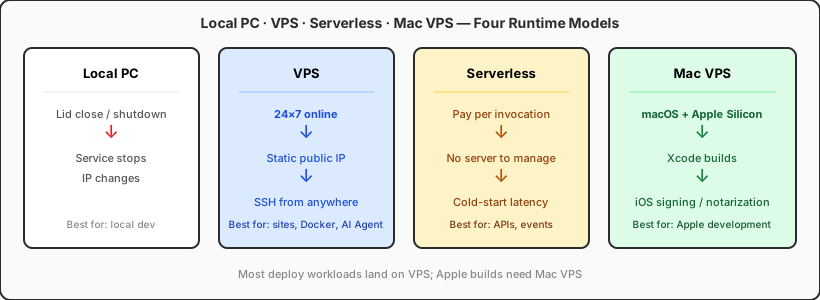
- Local computer: Close the lid or shut down and the service stops; home IPs change—poor fit for binding a domain
- VPS: Online 24×7, fixed public IP, SSH from anywhere—the default choice for websites, Docker, bots, and AI Agents
- Serverless: Pay per invocation; good for short API requests, not long connections or always-on processes
- Mac VPS (cloud Mac): Legitimate macOS environment for Xcode builds and iOS signing—a different role from Linux VPS, not a replacement
What can a VPS do? Local computer vs VPS
This table answers a common question: Can I do this locally? Is a VPS worth it?
| Use case | Local computer | VPS |
|---|---|---|
| Deploy a website | ❌ | ✅ |
| Docker | ✅ | ✅ |
| GitHub Webhook | ❌ | ✅ |
| API Server | ❌ | ✅ |
| Telegram Bot | ❌ | ✅ |
| MCP Server | ⚠️ | ✅ |
| AI Agent | ⚠️ | ✅ |
| Database | ⚠️ | ✅ |
Legend: ✅ suited for long-term stable operation · ⚠️ fine to try locally, not for 24×7 public service · ❌ hard to satisfy locally
The real reason most people buy a VPS is never "I want to learn Linux"—it's "I need to deploy something and keep it online."
How is it fundamentally different from "developing on a local computer"?
"I can run Docker on my laptop—why do I need a VPS?" That's the most common question.
The core tension with a local machine is: it belongs to you, but it doesn't belong to the internet.
- Close the lid and it sleeps—Webhooks miss callbacks
- Home broadband IPs change—domains are awkward to bind
- Shutdowns, updates, and reboots interrupt services
- Exposing databases and APIs to the public internet long-term is a security risk
A VPS solves a different layer of need: a stable, predictable runtime with a public IP. You write code locally, push to Git, then on the VPS run git pull && docker compose up -d—and the service stays online 24×7.
Why do developers almost all have one? Six real scenarios
"Almost everyone has one" is exaggeration—but if you have any of the needs below, renting a VPS is often cheaper than buying hardware or staying purely local. Ordered by what actually motivates most purchases:
1. Deploy websites and personal projects
This is the #1 reason for a first VPS: personal blogs, portfolios, landing pages, small SaaS backends, API services—you need somewhere to run them. VPS monthly fees commonly run from a few dollars to roughly equivalent in local currency; that's often cheaper than keeping an old PC on 24×7 for power, and more predictable than Serverless for "always online, low frequency" workloads.
2. Run Docker and containerized services
In 2026, Docker has become the default language of deployment—not just traditional web apps. AI tools, automation platforms, and open-source Agent frameworks almost always start their docs with docker compose up. A VPS gives you a clean Linux host dedicated to containers—without polluting your local environment, and with easier migration and rollback.
3. Bots, Webhooks, and scheduled jobs
- IM bots: Telegram, Discord, enterprise IM bots (e.g. WeCom)
- Webhook receivers: GitHub Actions callbacks, payment notifications, OpenClaw Gateway
- Cron jobs: scraping data, daily reports, database backups
What these share: processes that must stay online. A laptop isn't a fit; a VPS is.
4. Databases, caches, and middleware
MySQL, PostgreSQL, Redis, RabbitMQ, MinIO… spin up "your own cloud" on a VPS for dev integration, demos, or small production—far more convenient than starting containers locally and tearing them down every time. Teams also often give new hires a shared dev VPS during onboarding.
5. CI/CD and self-hosted runners
Individuals and small teams often run GitHub Actions self-hosted runners, Drone, or simple git push-triggered deploys on a VPS. When you need macOS / Xcode builds, you pick a Mac VPS (cloud Mac) instead—complementary to Linux VPS, not a substitute.
6. Learning and practicing Linux / DevOps
Want to understand Nginx reverse proxies, systemd services, firewalls, Let's Encrypt certificates? You can tinker on your own machine, but a VPS is closer to real production. Many developers' ops intuition was built on a cheap VPS—but that's usually a skill you pick up after buying, not the primary reason you buy.
Summary: What developers want isn't "another computer"—it's programmable, online infrastructure with public reachability. VPS sits right in that sweet spot.
Why is the AI era making VPS popular again?
If the dominant VPS story of the 2020s was "deploy blogs and side projects," the biggest new narrative in 2026 is: AI tools and Agents need a Linux host that's online 24×7.
Three shifts stack together:
- AI Agents can't close the lid — They receive Webhooks, reply on IM, run Cron, and hold long-lived MCP connections. Laptop sleep = Agent offline.
- Docker became the default delivery for AI tools — Setup went from "configure a Python venv" to "pull an image, start Compose." VPS + Docker is the shortest path.
- Remote / SSH is part of the AI coding workflow — Tools like Claude Code, Cursor, and OpenHands encourage developing on a remote Linux environment; a VPS is naturally that "remote machine."
So it's not that VPS suddenly got better—it's that the new generation of AI workloads needs exactly what VPS has always been good at—online, public, root, Docker.
Why do more and more AI tools recommend a VPS?
Open the official docs of mainstream AI dev tools and you'll find a quiet consensus: Linux + Docker + SSH + a machine that's always on.
| Tool / platform | Official or community-recommended runtime |
|---|---|
| Claude Code | Linux, Remote SSH, containerized deploy |
| OpenHands | Docker, Linux host |
| n8n | Docker, self-hosted Linux |
| Flowise | Docker, Linux VPS |
| Langfuse | Docker Compose, self-hosted |
| MCP Server | Long-running process; reachable via public network or tunnel |
That's not coincidence. Many pieces of the AI toolchain—Gateway, vector stores, observability dashboards, workflow engines—aren't "one browser click and done" short tasks; they're background services that must keep running. Fixed monthly VPS cost, full permissions, predictable behavior—often a better fit than Serverless for this load.
It also means more long-tail SEO queries: Claude Code VPS, OpenHands Docker deploy, AI Agent server—they point to the same answer.
Why do AI Agents almost always run on a VPS?
In one line: An Agent is a "always-on digital employee," not a "open the webpage, ask one question, and leave" chat.
Typical Agent workloads include:
- Claude Code / OpenHands: Keep editing code in a remote repo, running tests, opening PRs
- OpenClaw Gateway: Connect Telegram, Discord, Webhooks—receive messages 24×7
- MCP Server: Expose tools and data to Cursor, Claude Desktop—process must stay up
- n8n / Flowise: Automation workflows on a schedule—can't depend on your PC being on
- Langfuse: Trace LLM call chains—production needs stable ingestion
Their shared requirements:
| Requirement | Local computer | VPS |
|---|---|---|
| 24×7 online | ❌ | ✅ |
| Fixed public IP / stable domain | ❌ | ✅ |
| Docker multi-service orchestration | ⚠️ | ✅ |
| Remote collaboration with local IDE | ⚠️ | ✅ |
| Auto-restart after process crash | ⚠️ | ✅ |
So "my Agent runs on a VPS" is becoming as common as "my site is deployed on a VPS." For gateway-layer deployment in depth, see the OpenClaw Linux VPS Gateway deployment guide.
Linux VPS or Mac VPS?
These are two different categories—picking wrong wastes money:
| Need | Better fit |
|---|---|
| Web backend, database, bot, AI Agent, Linux toolchain | Linux VPS |
| Xcode builds, iOS signing, macOS-only software | Mac VPS / cloud Mac |
| OpenClaw Gateway, Webhook, 24×7 gateway | Usually Linux VPS |
| Flutter/iOS archive, TestFlight upload | Cloud Mac |
Many mature teams standardize on: Linux VPS for services and AI Agents + cloud Mac for Apple builds. The former is cheaper with a broad ecosystem; the latter handles Apple hardware and OS requirements you can't dodge.
For Mac vs Linux product boundaries in depth, see the Mac VPS and Linux VPS category guide.
How to pick your first VPS: four practical tips
1. Be clear what you're going to run
- Static blog + Nginx: 1 vCPU / 1 GB may suffice
- Multiple Docker containers + database: 2 vCPU / 4 GB is safer
- AI Agent + vector DB + observability: 2 vCPU / 4–8 GB, depending on model and concurrency
- Compile-heavy CI or local inference: size for peak separately
2. Prefer plans you can upgrade
Projects sometimes "suddenly go viral"; Agent call volume grows too. Pick a provider with seamless upgrades to avoid painful migrations.
3. Region affects latency—it doesn't mean "closer is always better"
Serving users in China → prioritize mainland China or Hong Kong nodes; integrating GitHub, OpenAI, or overseas APIs → US West, Singapore, etc. may fit better. Don't optimize only on ping—look at where your users and dependencies are.
4. Security defaults: SSH keys, firewall, don't expose root password login
First thing on a new machine:
# Example: after key-based login works, disable password auth
sudo sed -i 's/^#*PasswordAuthentication.*/PasswordAuthentication no/' /etc/ssh/sshd_config
sudo systemctl reload sshd
Then use ufw or the cloud provider's security group—open only 22 (or a custom port), 80, and 443.
What does it actually cost? Is "everyone has one" real?
An entry-level Linux VPS from overseas providers commonly runs $4–6/month; domestic lightweight servers on promo can land in a similar range. A coffee's worth of spend for a 24×7 sandbox—for individual developers and AI experiments, the value is hard to beat.
"Everyone has one" is more accurately: in the developer toolchain, VPS sits alongside a GitHub account, an IDE, and a domain as baseline infrastructure spend. You don't have to buy today—but once you build "something for others"—or want an AI Agent working 24×7—you almost always end up here.
Common misconceptions
Myth 1: VPS = cloud server, pick any → Both work for personal projects, but billing, scaling, snapshots, and backups differ a lot—read whether it's pay-as-you-go or monthly before you commit.
Myth 2: Buying a VPS makes you an ops person
→ A VPS is only the start. SSH, journalctl -u your-service, backups—that's when you're really using it. AI tools lower the bar; they don't replace basic security hygiene.
Myth 3: A Mac can be used as a VPS → In casual talk, VPS means a Linux VM. macOS can't legally run on a generic x86/Linux VPS; for macOS, choose cloud Mac / Mac VPS products.
Myth 4: Bigger VPS is always better → Idle resources are waste. Start small, watch CPU/RAM, then scale up.
Myth 5: AI tools only run locally → More Agents and MCP services need to stay online. Local is fine for debugging; production-grade Agents almost always move to a VPS.
Closing thoughts
At its core, a VPS turns "a data center" into a monthly developer subscription. One person can have a public IP, full system access, and 24×7 uptime—the soil where websites, APIs, databases, bots, and AI services grow.
For most developers, the first VPS is often the starting point of their whole dev infrastructure. It keeps websites, APIs, databases, and AI services stable online; when the project needs iOS development, Xcode builds, or macOS-only tools, add a cloud Mac and you cover the full workflow from Linux service deploy to Apple development.
VPSSpark offers cloud Mac services for teams that need remote macOS, iOS CI/CD, or Xcode builds. If you already have a Linux VPS, cloud Mac becomes another block in your Apple dev chain—not a replacement for it.
Linux for services, cloud Mac for Apple builds
Already running sites and AI Agents on Linux VPS? When you need Xcode and iOS CI, cloud Mac is the next layer in the stack.
VPSSpark cloud Mac mini M4—monthly plans for remote macOS dev and build queues.