If you've recently tried following an AI tutorial to build something, you've probably run into this.
In the video, the instructor types just one line:
docker compose up -d
And the whole system comes up.
But your computer has nothing installed.
What is Docker? Why does nobody explain it? Why do AI official tutorials assume you already know?
This experience happens to people every day. You're not alone—and you're not slow.
A real pattern: tutorials suddenly become incomprehensible
Many people assume they're falling behind: others nail it with one command, and they don't even know what step one is doing.
The problem is usually not you—it's that tutorials changed how they're written. They used to walk you through environment setup from zero; now they jump straight to "get it running"—and assume you already know the big chunk in the middle.
Where you get stuck is usually not AI itself, but the whole stack behind that one command. Tutorials won't unpack it, yet the comments are full of discussion—so the more you read, the more confused you feel.
Why this happened: you're not behind—the software changed
Zoom out over time and the shift is obvious.
Tutorials five years ago often started with:
pip install
Today it's almost always:
docker compose up -d
You're not falling behind. AI software itself changed.
Compare with what you already know:
- ChatGPT — open the web app—no install
- Claude — same
- Gemini — same
But when you want to deploy AI yourself—on your own machine or server, not just someone else's website—the picture changes. You've probably heard at least one or two of these:
- Dify
- Open WebUI
- n8n
- AnythingLLM
Open their official docs to page one and you'll likely see:
docker compose up
Docker has become the AI world's installer. Not a quirk of one niche project, but how this whole category of products is shipped. Once you read this far, that one line in the video won't feel so random.
Do you actually need to learn Docker?
This is what most people searching for this article really want to know. Straight answer:
| Your goal | Need to learn? |
|---|---|
| Use ChatGPT, Claude, Gemini in the browser | No |
| Use mobile apps or official clients | No |
| Deploy your own AI stack on your hardware | Almost certainly |
| Run Agents, bots, keep services online 24/7 | Almost certainly |
| Try open-source AI or self-hosting tutorials | Almost certainly |
In one line:
Docker is no longer just a backend engineer's tool—it's becoming a baseline skill for AI developers.
You don't need to become a DevOps expert. But if your goal is "install AI myself," you'll meet docker compose up in tutorials sooner or later—knowing that upfront beats starting from zero confusion every time.
The technical reason—why this one command
You don't need every detail right now. Just why maintainers chose this path:
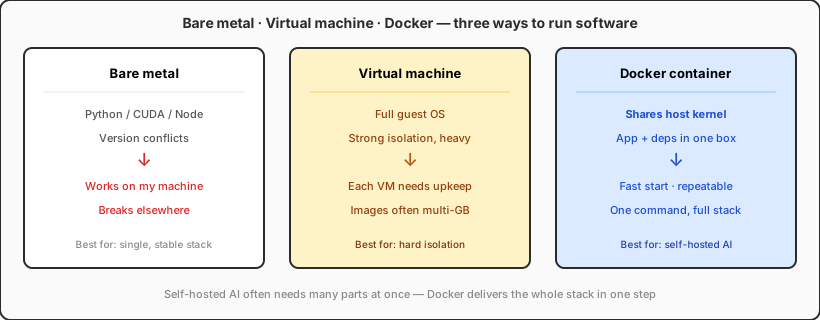
Self-hosted AI is rarely just a chat box—it often needs a database, UI, background jobs—many pieces running together. Teaching manual installs on Windows, Mac, and Linux separately is more than most teams can support.
So the industry picked the shortest path: bundle the whole environment and install it with one command. That's Docker's role in AI tutorials—not to trip up beginners, but to skip hundreds of "it won't install on my machine" threads.
What this means for you
Two paths—no ranking, just different goals.
Path A: cloud AI only. Keep using ChatGPT, Claude, etc.—no Docker needed. For most people, that's enough.
Path B: self-host. You want data on your own hardware, local models, or a 24/7 assistant from a tutorial—you'll keep seeing docker compose up. It's not optional flair; it's the official on-ramp.
Many people are stuck in the middle: they've watched countless "build AI in 30 minutes" videos and fail at step one. It's not that AI is hard—it's that the install story switched to a new language tutorials never translate for you.
If you choose path B, the most practical start isn't a full course—it's pick one project you actually want, open its official docs, and get the first run working. Install Docker → copy config → run that one line → see the UI open. The bugs you hit teach more than any concept lecture.
To keep services online when your laptop sleeps, you usually need a machine that stays on (many people use a VPS). That's a later step; the first is still getting that one command working locally or on a server.
What happens next
A few likely directions:
- Tutorials will explain Docker less and less, like few people today teach "what double-clicking an icon means"—it becomes a default assumption.
- "Web AI" and "self-hosted AI" will be two clearer lanes, with a growing skill gap between them.
- Self-hosting will get easier but won't return to the pip install era—products grew more complex; one-command full-stack delivery isn't reversing.
- More managed services will appear for people who don't want installs; but those who want full control, private networks, or source changes still face Docker as the front door.
Bottom line: in 2026, AI tutorials "assume you know Docker" not because authors are lazy, but because AI software ships with a new install model. You don't need anxiety—but it's worth deciding: do you want to use AI, or install AI?
If you just chat, write, and ask questions, keep using ChatGPT and Claude. If you're drawn to self-hosting, that docker compose up -d line isn't a roadblock—it's the doorknob to a new room. At least now you know where the door is.
If your project also involves Apple development (Xcode, iOS builds), that's another infrastructure lane; VPSSpark cloud Mac covers that half. Docker and remote servers are the default homework for the "install AI yourself" half.
Self-host AI with Docker; use cloud Mac for Apple dev
On the self-hosted AI path, Docker and a remote server are a common pair. When you need Xcode and iOS builds, cloud Mac covers the other half.
VPSSpark cloud Mac mini M4, monthly subscription—built for remote macOS dev and build queues.