
Bottom line: Most RAG knowledge bases fail not because you picked the wrong embedding model, but because PDFs were ingested without pre-flight checks—scanned pages treated as text layers, tables shredded into noise, headers and footers polluting every chunk, multi-column layouts read in the wrong order. This guide covers five checks you must run before any RAG PDF Parsing pipeline goes to production, with sampling commands, a parser matrix, and a chunking gate checklist.
If you are piping manuals, papers, or contracts into LangChain, LlamaIndex, Dify, or a custom stack, read this in order: validate quality first, chunk second. Keywords: RAG PDF Parsing, PDF Parsing Best Practices, AI PDF Parsing.
Last reviewed: August 7, 2026. Parser behavior follows current PyMuPDF, pdfplumber, and LlamaIndex loaders.
Why PDF is the riskiest format in RAG
PDF was built for print fidelity, not semantic storage. A single page can stack text layers, vector graphics, embedded fonts, invisible OCR layers, and scan images—generic get_text() may return characters without preserving reading order. RAG amplifies every mistake: dirty text → bad chunk boundaries → embedding drift → irrelevant retrieval → confident hallucination.
A common failure mode: 800 product PDFs dropped into a default loader. Two weeks later a support agent cites footer copyright lines as product specs. Root cause: 60% scans, 30% two-column layouts, one parser for everything. Fixing it means re-parsing, re-embedding, and re-indexing—far more expensive than five pre-import checks.
PDF Parsing Best Practices rule #1: route by document type, not “one loader to rule them all.”
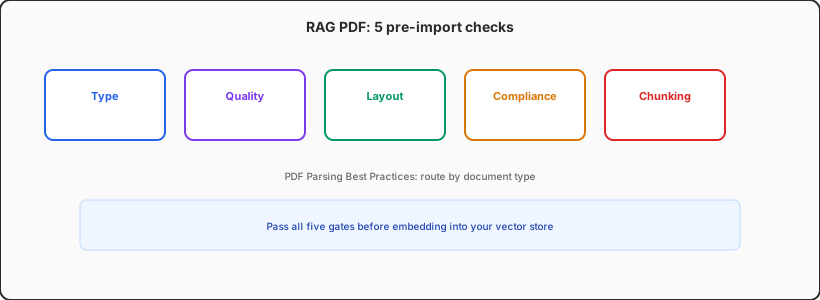
Check 1: Native text vs scanned PDF
Goal: In 30 seconds, know whether to use text extraction or OCR + layout analysis.
How:
- Run
pdfinfoor PyMuPDF; ifpage.get_text()returns < 50 chars per page with heavy image objects, assume scan/image PDF. - Sample 3 pages (first, middle, last): can you select text in order?
- Inspect Producer/Creator metadata—some “Print to PDF” flows create broken pseudo text layers.
Pass: ≥ 90% of sampled pages have continuous, correctly ordered text.
Fail: Route to OCR (Tesseract, PaddleOCR, or managed LlamaParse). For batch jobs, run OCR workers on a separate agent orchestration host so embedding queues do not stall.
Mixed PDFs are normal: scanned cover + selectable body. Classify per page and store page_type metadata for downstream chunking and retrieval weighting.
Check 2: Text extraction quality sampling
Goal: No encoding garbage or hidden characters in embeddings.
How:
- Export text from 5 random pages; search for replacement chars, private-use Unicode, ligature splits (fi, fl).
- Compare PDF source vs extracted text for SKUs, version numbers, API paths—high-value retrieval tokens.
- For CJK PDFs, verify simplified/traditional and full/half width are not mixed.
Pass: Critical entities match 100%; garble rate < 0.5%.
Fail: Swap parsers—pdfplumber for tables, PyMuPDF for bulk text, layout tools for academic pages. See LangChain’s PDF loader guide; always validate on samples.
Check 3: Layout—columns, tables, headers/footers
Goal: Reading order matches human understanding, not draw order.
How:
- Multi-column: left column finishes before right; if interleaved, use layout detection or bbox reordering.
- Tables: sample 2 files—cells must not collapse into comma soup. Store as Markdown tables or dedicated
content_type=tablechunks. - Headers/footers: if the same line appears in > 40% of chunks, strip at parse time.
Pass: Three human spot-checks read coherently; tables are two-dimensional; headers/footers excluded.
Fail: Use partition parsers (Unstructured hi_res, Docling, etc.) or dedupe repeated lines before chunking. AI PDF Parsing pain is usually layout, not raw OCR accuracy.
Check 4: Security and compliance
Goal: No encrypted, PII-heavy, or non-licensed content in the index.
How:
- Skip or decrypt password PDFs; log
skipped_encryptedcounts. - PII scan (email, phone, ID patterns) for contracts and tickets—redact or isolate indexes.
- Legal sign-off on copyright and data processing; internal indexing may still violate terms.
- Never log full extracted text in production. See agent memory vs chat logs for storage boundaries.
Check 5: Chunking readiness and metadata
Goal: Parsed output is structured enough to chunk meaningfully.
How:
- Keep
page_number,source_file,section_titlewhen available. - Preview fixed windows vs heading-based splits on 20 sample questions.
- Watch chunk length distribution—too many < 100 token shards dilute semantics.
- If using long-context reranking, model context caching cost—clean parsing reduces “stuff the whole doc” workarounds.
Pass: Metadata completeness > 95%; top-3 chunks cover answer sections; no systematic footer pollution.
Parser quick reference (2026)
| Scenario | Start with | Strength | Caveat |
|---|---|---|---|
| Bulk text PDFs | PyMuPDF | Speed | Complex layout needs help |
| Financial/spec tables | pdfplumber | Cell coordinates | No OCR |
| Scans / image PDFs | OCR + layout | Recall | Cost + QA |
| Enterprise automation | LlamaParse / Unstructured | Partitioning | Per-page billing |
Maintain a golden sample set (10–20 nasty PDFs: two-column, tables, scans, vertical CJK) and rerun the same Q&A eval whenever you change parsers—better than arguing which library is “best.”
Recommended import pipeline
- Enqueue with file hash dedup and classification metadata.
- Checks 1–2: auto type + text sample; OCR branch for scans.
- Check 3: layout parse, header/footer strip, table structure.
- Check 4: PII/encryption filter; quarantine failures.
- Check 5: structure-aware chunking + metadata; small-batch Q&A gate.
- Embed and index only after pass; version parsers for re-runs.
RAG ingestion is a living data product, not one-shot ETL. Parser drift often outpaces model upgrades.
One question for stakeholders
Ask: “When users ask questions, should citations land at page, section, or table-row granularity?” That sets how strict checks 3 and 5 must be.
For wiring retrieval into agents, continue with single-agent to multi-agent pipelines.
Heavy parsing load? Put compute where it belongs
Batch OCR and embedding can saturate a laptop for hours. Run parsing workers on a Cloud Mac or Linux VPS, keep local machines for QA and golden-set evals. VPSSPark offers cloud dev environments sized for document-heavy RAG workflows.