In 2026, AI Agents have moved past “chat demos” into production components that run 7×24: auto-replying to email, watching monitors, pulling data, calling APIs, and executing multi-step workflows. Most people stall on the same question—the Agent code works, but which machine should actually run it? Is a local laptop enough? Do you need a VPS? Should you rent a GPU for inference?
This article follows a “pick infrastructure first, then tune details” path: how Agent server needs differ from ordinary web apps, a comparison table of local machine, VPS, and cloud GPU, then 2026-ready deployment configs and common pitfalls. Whether you just got your first Agent running or you are about to put a personal assistant in the cloud, you can follow the map.
What “server” does an AI Agent actually need?
Short answer: most Agents do not need a dedicated GPU server for large models. The dominant 2026 pattern is split “orchestration + model” layers—frameworks like LangGraph, OpenClaw, CrewAI, and Cursor Agent handle scheduling, memory, and tool calls; actual LLM inference usually goes through OpenAI, Anthropic, DeepSeek, or similar APIs, or a separate GPU / high-memory machine running Ollama.
So an “AI Agent server” usually means several resource types, not one bare metal box:
- Orchestration runtime: Agent processes, Gateway, Webhooks, cron—needs CPU and RAM, but typically no hard GPU requirement if everything goes through cloud APIs.
- Model inference node: local Ollama, vLLM, TensorRT-LLM, etc.—this is where GPU or a large unified-memory Mac matters.
- Supporting infrastructure: vector stores (Qdrant, pgvector), Redis sessions, Postgres state, object storage—the longer the Agent runs, the more you depend on these.
- Egress networking: third-party APIs, web scraping, Slack/Telegram—needs stable public internet and sensible firewall rules.
If you still separate “AI Agent hosting” from “Agent infrastructure,” remember: hosting is where the process lives; infrastructure is the full stack the Agent needs to stay alive. Small projects can fit on one VPS; at scale, split into “orchestration VPS + inference GPU + managed database.”
Three options in one table: local, VPS, cloud GPU
| Option | Best for | Typical config (2026) | Monthly cost ballpark | Main limitation |
|---|---|---|---|---|
| Local machine | Dev, personal trials, offline privacy | 16–32GB laptop / Mac mini; optional local Ollama | One-time hardware | Stops when you shut down; public access is awkward; hard to run 7×24 |
| VPS | Always-on runs, Webhooks, multi-Agent orchestration, API integration | 2–4 vCPU, 4–8GB RAM, 80GB SSD; Ubuntu LTS + Docker | ~$5–40/mo | No GPU; local inference needs a separate node |
| Cloud GPU | Self-hosted model inference, high concurrency, low-latency local models | NVIDIA L4 / A10 / A100; 24GB+ VRAM common | ~$0.3–3/hr and up | Pay-as-you-go adds up; higher ops bar; you must tune model serving |
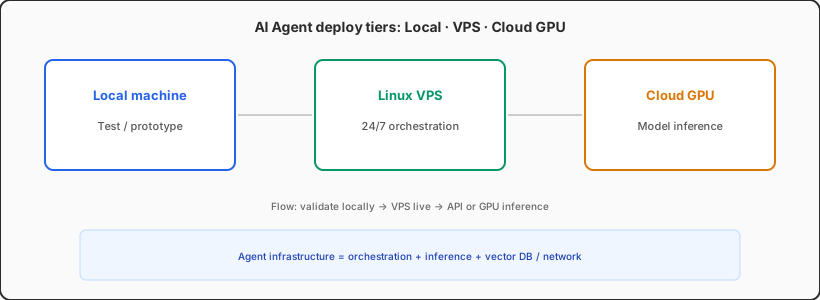
The selection logic in one line: test locally, run long-term on a VPS, put model inference on cloud GPU (or a high-memory Mac running Ollama). Details below.
Option 1: Local machine—best for testing and prototypes
Running an Agent on a MacBook, Windows desktop, or Mac mini is still the strongest first step in 2026. The reasons are practical: edit code, tail logs, and debug with breakpoints without configuring TLS and systemd on day one. Park API keys in .env for experiments.
When is local enough?
- Only you use it; no public Webhooks (GitHub, Slack callbacks, etc.).
- Jobs are manual, or the machine stays awake.
- Models go through OpenAI / Claude APIs; the box only runs light orchestration.
- You want local Ollama with a 7B model—16GB is a taste test, 24GB is more comfortable; see our Ollama RAM sizing guide.
Typical local stack: Python 3.11+ or Node 20+, uv / pnpm, Docker Desktop (optional), OpenClaw / LangGraph as local processes. Mac users juggling Xcode and Agents should aim for 24GB+ unified memory, or offload heavy work to a cloud Mac as a second environment.
Do not force locally: 7×24 support bots, external SaaS, multi-tenant concurrency—sleep, power cuts, and home NAT will teach you fast. Once validated, move to a VPS.
Option 2: VPS—the default for always-on Agents
When the Agent must stay online, accept Telegram/Discord bots, answer HTTPS Webhooks, and run cron plus queues, a Linux VPS is the 2026 default. This is what people usually mean by “AI Agent hosting”: cheap, controllable, and scriptable ops are mature.
What belongs on a VPS?
- OpenClaw Gateway, LangGraph API Server, FastAPI-wrapped Agent backends.
- Agent nodes inside n8n / Dify workflows (long-running schedules).
- Vector DB + Redis + Postgres middleware (small traffic can share one Docker Compose host).
- Via SSH tunnel or reverse proxy, reach home Ollama—orchestration in the cloud, inference at home; see our OpenClaw + home Ollama troubleshooting guide.
New to VPS? Read What is a VPS. For distro choice, see Ubuntu / Debian / Rocky comparison.
2026 VPS sizing (by scale)
| Scale | vCPU / RAM | Disk | Typical workload |
|---|---|---|---|
| Personal single Agent | 2 vCPU / 4GB | 40–80GB SSD | One Gateway + API calls, no local vector DB |
| Small team / multi-Agent | 4 vCPU / 8GB | 80–160GB SSD | Docker Compose multi-service, Qdrant, scheduled jobs |
| Production orchestration | 8 vCPU / 16GB+ | 160GB+ SSD | Queue smoothing, replicas, dedicated DB (inference still external) |
System baseline: Ubuntu 24.04 LTS or Debian 12, UFW allowing only 22/80/443, Caddy or Nginx for reverse proxy and auto HTTPS, processes under systemd or Docker. For containers, see Docker and AI app deployment. Multi-Agent pipelines: single agent to multi-agent pipelines.
Option 3: Cloud GPU—for model inference only
Cloud GPU answers who computes tokens, not “where the Agent process lives.” You need it when self-hosting Llama, Qwen, DeepSeek, or other open weights, cutting API bills, or keeping data inside a private network.
Signals you should consider cloud GPU:
- 7B+ models at meaningful concurrency; monthly API spend already beats GPU rent.
- Private deployment (finance, healthcare, government intranet); VPS CPU on GGUF is too slow.
- RAG + reranking + multi-model routing; one Mac does not have enough memory.
Common 2026 picks:
- Entry inference: NVIDIA L4 (24GB) or T4—7B–13B quantized, moderate QPS.
- Primary inference: A10 24GB / L40S—14B–32B with vLLM continuous batching.
- Training / very large models: A100 80GB multi-GPU—team scale; rare for personal Agents.
Typical ops: Ollama / vLLM / TGI on the GPU host; Agent on VPS calls the inference endpoint over private network or authenticated HTTP—orchestration and inference stay separate so scaling one does not block the other. If you only use APIs today, skip GPU and spend on a steadier VPS plus monitoring.
Recommended architecture: hybrid deployment (2026 practice)
Mature teams rarely put everything on one box. For individual developers, this hybrid layout offers the best value:
- Local / cloud Mac: write Agent logic, test tool calls, iOS / macOS builds.
- Linux VPS (4C8G): 7×24 Gateway, Webhooks, database, vector store; models via API or SSH to home Ollama.
- GPU on demand: spin up pay-as-you-go GPU only when self-hosted traffic grows, or dedicate a high-memory Mac to inference.
Same three layers as before—test → always-on → inference: Agent infrastructure can grow incrementally; you do not need the full stack on day one.
Pre-launch checklist
- Secrets: API keys and DB passwords in environment variables, not Git;
.envon VPS mode 600. - Egress: Agent must reach model APIs and tool endpoints; watch corporate proxies.
- Ingress: Webhooks require HTTPS; rotate bot tokens on a schedule.
- Resource caps: timeouts, max_tokens, daily budget alerts on LLM calls.
- Observability: structured logs plus process health checks at minimum; Sentry / Grafana for production.
- Backups: snapshot Agent state DB (Postgres / SQLite) and vector stores regularly.
Five common pitfalls
- 2GB VPS running Gateway and Ollama 7B together—OOM restart loops; split roles or use APIs.
- API keys in frontend or public Docker images—repo scanners work 24/7; bills explode.
- Exposing a home Agent directly to the internet—use VPS reverse proxy + firewall; do not open home broadband ports.
- Unbounded Agent loops—tool-call cycles burn tokens; always set max_steps.
- Timezone and cron drift—VPS defaults to UTC; “off by 8 hours” on scheduled jobs is common.
How should I choose? Quick decision
| Your situation | Recommendation |
|---|---|
| Still tuning prompts and tools; only you on one machine | Local machine |
| Telegram/Slack bot must stay online 7×24 | VPS (models can stay on API) |
| API bill > $100/mo and you mostly run open 7B–14B | Evaluate cloud GPU or 24GB+ Mac Ollama |
| Apple development plus always-on Agent | Cloud Mac for dev + Linux VPS orchestration |
Bottom line: there is no single “server” for AI Agents. Local for fast iteration, VPS for reliable uptime, cloud GPU for compute. The lowest-friction 2026 path is often VPS orchestration + API inference; pay for GPU only when traffic or compliance forces your hand.
Need 7×24 Agents? Split work across cloud environments
A local machine is ideal for proving Agent logic, but Webhooks, bots, and long-running single agent to multi-agent pipelines still need a stable Linux VPS or cloud dev host. If you build for Apple (Xcode, TestFlight) and do not want your laptop on 24/7, VPSSpark cloud Mac mini M4 is a dev and build environment paired with an Agent Gateway on VPS: code on Mac, tasks in the cloud.
Ready to move from “local toy” to always-on productivity? Explore VPSSpark plans and right-size cloud Mac vs VPS for your scenario—less time lost on infrastructure.