
Bottom line: When you need to OCR tens of thousands of scanned PDFs, the bottleneck is rarely “which OCR engine” alone. It is whether you preflight and route files, parallelize work, and run a resumable queue. Clicking through a desktop app one file at a time can take weeks on 10k documents; the pipeline below on an 8–16 core VPS or GPU workers often compresses the same volume to hours or a couple of days—if you accept engineering trade-offs: fast screening first, precision OCR second, bad pages quarantined.
This guide targets archives, legal bundles, medical reports, historical papers, and enterprise contract scans—typically 10k–100k+ files, mostly pure scans or mixed PDFs. Keywords: batch OCR, scanned PDF recognition, ocrmypdf, PaddleOCR. If results feed RAG next, read our RAG PDF Parsing best practices for import gates—OCR is only stage one.
Checked 2026-08-08 against OCRmyPDF docs, Tesseract, and PaddleOCR.
Why bulk scanned PDF OCR feels unbearably slow
Common failure mode: drop a folder into a GUI tool, CPU sits at 15%, fan quiet, 200 files overnight. Root causes stack:
- Serial processing—one process, many idle cores.
- No preflight—30% already have text layers but still run full OCR.
- File-level parallelism only—an 800-page binder blocks one worker while small files churn startup cost.
- Heavy output—recompressing images and embedding fonts every page.
- No checkpointing—crash at file 9,000, restart from zero.
At tens of thousands of files, pipeline design beats engine tuning by an order of magnitude. Fastest path first, then scale architecture.
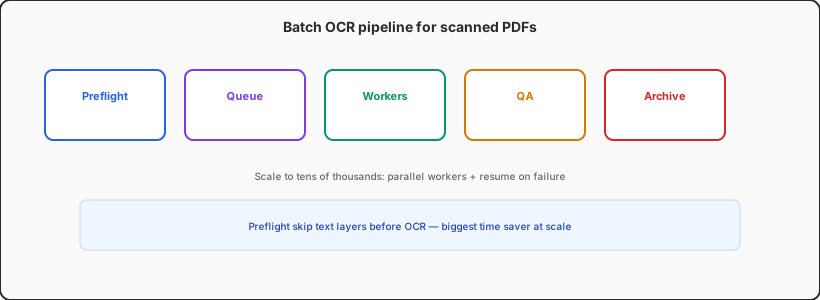
Step 0: Preflight routing—don’t OCR what doesn’t need it
Before any OCR, scan the tree (Python multiprocessing or find | parallel):
- Count
get_text()per page via PyMuPDF /pdfinfo. Pages above ~80 readable chars → tagtext_layer, copy to output, skip OCR. - Encrypted or corrupt PDFs →
quarantine/so they don’t stall the queue. - Mixed PDFs: route per page—biggest time saver at scale.
One legal project: 42k PDFs, 38% already had text, 12% encrypted—only ~50% needed OCR. That halved wall-clock time before touching engine choice.
Tip: Emit a CSV manifest (path, pages, type, estimated OCR pages). Schedule by OCR pages, not file count.
Fastest path today (1k–5k files)
On an 8-core Linux box or cloud VPS today:
- Install
ocrmypdf+ Tesseract (chi_sim/chi_trafor Chinese). GNU parallelorxargs -Pper file; concurrency ≈ CPU cores − 1.- Flags:
--skip-text, low--optimize,--jobs 1inside each ocrmypdf to avoid nested overload. - Write to local SSD temp,
rsyncto object storage after batches—network mounts kill throughput.
cat scan_only.txt | parallel -j 8 \
                  'ocrmypdf --skip-text --optimize 0 --language chi_sim+eng \
                   {} /data/ocr_out/{/.}.pdf'
Tesseract deploys in minutes; PaddleOCR often wins on complex Chinese—run a second pass on low-confidence pages, not a full rerun.
10k+ architecture: queue, workers, resume
- Queue: Redis+RQ, Celery, or cloud Batch. Task = one PDF or page range.
- State DB: SQLite/Postgres with
file_hash, status, retries, engine version. - Scale out: multiple mid-size VPS nodes often beat one giant box for CPU-bound OCR.
- Page-level parallelism:
pdftoppm→ per-page queue → merge text layers for 200+ page binders. - GPU pool: PaddleOCR/Surya on separate workers; route by language/layout.
You don’t need Kubernetes day one. Many teams run Docker Compose + Redis on 2–4 VPS workers: one for queue/metadata, rest OCR-only.
Tool matrix: speed, Chinese, searchable PDF
| Stack | Best for | Throughput | Caveat |
|---|---|---|---|
| OCRmyPDF + Tesseract | Latin-heavy, searchable PDF output | CPU-friendly | Weak on complex Chinese layout |
| PaddleOCR self-hosted | Chinese / mixed docs, tables | Fast per page on GPU | You merge text back into PDF |
| Commercial APIs | Compliance, no ops | Elastic | Cost at 100k pages |
Fastest ≠ cheapest: benchmark 200 representative files on accuracy × seconds/page × price before committing.
Another 30–50% speed: practical knobs
- Try 300 DPI renders if source is 600 DPI—often enough for contracts.
- OpenCV denoise/threshold for clean B&W scans.
- Load minimal language packs only.
- Skip blank/stamp pages via pixel variance.
- Export
.txt/.jsonlif search-only; heavy PDF/A only for archive tier. - Point
TMPDIRat local NVMe on cloud VMs.
Hold speed and quality together
After the batch: sample 0.5% for human read-through or CER; regex-check ID-heavy pages; re-queue low-confidence pages. Bad OCR in a search index costs more than a second engine pass. Archive projects need audit logs—who, when, which engine version.
Back-of-envelope: 50k OCR pages
At ~5 s/page Tesseract mid-range: ~69 h single-threaded; ~8–12 h on 8 cores; ~4–6 h on two 8-core workers; GPU PaddleOCR often 1–3 s/page—scale cards linearly. Measure your own 100-page sample for pages_per_hour.
Checklist you can copy
- Recursive inventory + SHA256 dedupe manifest.
- Preflight:
text_layer/scan/mixed/encrypted. - Enqueue (balance by OCR page count).
- Parallel OCR with
--skip-textor page routing. - Searchable PDF or sidecar text + JSON metadata.
- Sample QA + low-confidence second pass.
- Archive with
ocr_engine_versionfor future reruns.
For RAG downstream, keep page types in metadata. Long-context cost control: see our Context Caching cost guide.
One last line
There is no silver bullet for tens of thousands of scans—there is a repeatable fastest path: preflight cuts half the wasted OCR → queue survives crashes → workers saturate CPU/GPU → QA blocks bad pages. Get the pipeline green first; tune engines second.
Batch OCR saturating CPU? Run workers in the cloud
Tens of thousands of pages are classic batch compute—laptops hate 72-hour full load, but Linux VPS or GPU workers scale horizontally with resume. Debug scripts on Cloud Mac, heavy OCR on queued nodes. VPSSpark offers cloud dev environments and VPS sized for digitization and knowledge-base builds.