
At 3 AM the on-call phone buzzed: monitoring reported the / partition at 98% full, MySQL could not write binlogs, and CI deployments died mid-docker pull with no space left on device. We SSH'd in, ran df -h, and found 412 MB free on root—not a malware drop, just three months of unchecked logs, Docker layers, apt cache, and journal slowly eating a 40 GB VPS disk.
This failure mode is everywhere on small VPS instances: modest disk, 24/7 containers, image pulls, and relentless logging. Manual rm -rf is slow and risky; the reliable playbook is find the heavy hitters first, then batch-clean directories that can be regenerated. This article packages the one-click cleanup script we have run repeatedly in production, with clear notes on what is safe to automate and what needs a second look.
Prerequisites: SSH access and sudo. If you cannot connect at all (for example, SSH keys cannot be written), start with our Linux server SSH connection refused troubleshooting guide to rule out disk-full vs network/firewall issues. Before tweaking UFW rules, free space first—services need room to write logs before anything else behaves normally.
Disk full: what breaks first?
When the root filesystem fills up, Linux symptoms feel random: SSH still works, but vim cannot save, apt install fails, Docker containers refuse to start, and Nginx returns 500 while error.log stops growing. MySQL and PostgreSQL may flip read-only or crash outright; systemd services restart in loops because they cannot create pid files or write sockets. Cron jobs fail silently when they cannot append to their log files, and package managers leave half-installed state that is painful to unwind under pressure.
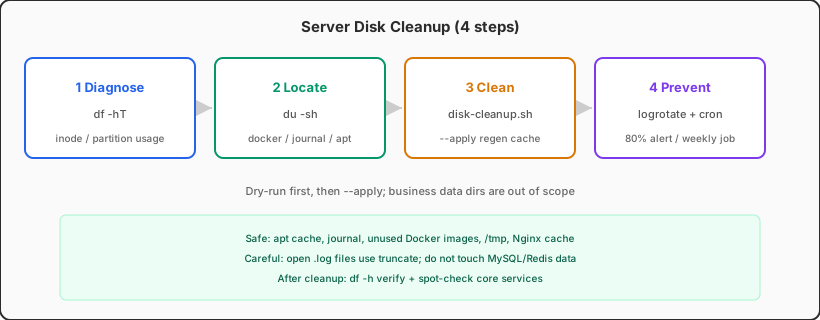
Step one is always checking mount points—not guessing which folder "looks big". A separate /data volume can still have plenty of room while root is wedged; treating "disk full" as a single number without df -hT has sent more than one engineer down the wrong rabbit hole:
# Free space per partition
                df -hT

                # Largest top-level dirs under / (can be slow)
                sudo du -xh --max-depth=1 / 2>/dev/null | sort -hr | head -20

                # Inode exhaustion also looks like "full disk"
                df -ih
du can take a long time on hosts with millions of files. If the machine is already sluggish, spot-check suspects instead: sudo du -sh /var/lib/docker /var/log /var/cache. The official du(1) manual explains -x (stay on one filesystem) and --apparent-size—do not let cross-mount totals mislead you when bind mounts or separate volumes are involved.
Common disk hogs: reference table
Every stack is different, but the paths below show up constantly on Ubuntu and Debian VPS instances. Web + Docker + CI on a single 40 GB disk is a familiar recipe: journal and container layers grow in the background while application logs spike during traffic events. The table marks whether a script can safely clear them in one shot—rows marked "caution" need a dependency check before you touch anything. When in doubt, dry-run du on the path and read what process still has files open with lsof +D /path before deleting.
| Path / source | Typical size | Auto-safe? | Notes |
|---|---|---|---|
/var/lib/docker |
Several GB to tens of GB | Partial | Dangling images, stopped containers, unused volumes; do not delete data volumes for running containers |
/var/log/journal |
1–10+ GB | Yes | systemd journal grows fast when no size cap is configured |
/var/log/*.log |
Hundreds of MB to GB | Caution | Truncate or logrotate; deleting files outright may leave open fds and stale inodes |
/var/cache/apt |
Hundreds of MB to several GB | Yes | apt-get clean is safe—only removes downloaded .deb packages |
/tmp, /var/tmp |
Varies | Partial | Delete files not accessed in 7 days; watch for apps storing uploads here |
Nginx proxy_cache |
Several GB | Yes | Cache rebuilds; if you followed our Nginx reverse proxy tuning guide, expect brief cache MISS after purge |
Old kernels under /boot |
Hundreds of MB | Yes | apt autoremove --purge removes old kernels; keep current and previous |
| Core dumps, crash reports | Varies | Yes | /var/crash, application core.* files |
/home, /var/lib/mysql, object-storage mounts, or backup directories top the list, cache cleanup will not save you—you need archival, a resize, or cold-data migration. Scripts reclaim regenerable space; they do not replace capacity planning.
One-click cleanup script (copy-paste ready)
The script below defaults to dry-run mode: it prints space that would be freed and commands that would run. Pass --apply to actually delete. Always dry-run first and sanity-check the output before applying—we have seen teams skip this once, prune a week-old base image that happened to be the only copy of a retired service, and spend an hour rebuilding a deploy pipeline from scratch. Modules are split so you can comment out sections you do not need (skip the Docker block if Docker is not installed, or comment out Nginx cache if you run without proxy_cache).
#!/usr/bin/env bash
                # One-click server disk cleanup — regenerable cache only
                # Usage: sudo ./disk-cleanup.sh          # preview
                #        sudo ./disk-cleanup.sh --apply  # execute
                set -euo pipefail

                APPLY=false
                [[ "${1:-}" == "--apply" ]] && APPLY=true

                log() { echo "[$(date '+%F %T')] $*"; }
                run() {
                  if $APPLY; then
                    log "EXEC: $*"
                    eval "$@"
                  else
                    log "DRY-RUN: $*"
                  fi
                }

                before=$(df -h / | awk 'NR==2 {print $3 " used, avail " $4}')
                log "Before: $before"

                # 1. apt cache
                if command -v apt-get >/dev/null; then
                  run "apt-get clean -y"
                  run "apt-get autoremove -y --purge"
                fi

                # 2. systemd journal — keep last 7 days or 500MB
                if command -v journalctl >/dev/null; then
                  run "journalctl --vacuum-time=7d"
                  run "journalctl --vacuum-size=500M"
                fi

                # 3. Docker unused resources (excludes named volume business data)
                if command -v docker >/dev/null && docker info >/dev/null 2>&1; then
                  run "docker system prune -af --filter 'until=168h'"
                  run "docker builder prune -af --filter 'until=168h'"
                fi

                # 4. temp dirs — not accessed in 7 days
                run "find /tmp /var/tmp -type f -atime +7 -print 2>/dev/null | head -20"
                if $APPLY; then
                  find /tmp /var/tmp -type f -atime +7 -delete 2>/dev/null || true
                fi

                # 5. Nginx proxy_cache (adjust cache_path to match yours)
                NGINX_CACHE="/var/cache/nginx"
                if [[ -d "$NGINX_CACHE" ]]; then
                  run "du -sh '$NGINX_CACHE'"
                  run "find '$NGINX_CACHE' -type f -delete 2>/dev/null || true"
                fi

                # 6. crash dumps
                [[ -d /var/crash ]] && run "rm -rf /var/crash/*"

                # 7. pip / npm cache (if present)
                [[ -d /root/.cache/pip ]] && run "rm -rf /root/.cache/pip/*"
                for u in /home/*; do
                  [[ -d "$u/.npm" ]] && run "npm cache clean --force --cache '$u/.npm' 2>/dev/null || rm -rf '$u/.npm/_cacache'"
                done

                after=$(df -h / | awk 'NR==2 {print $3 " used, avail " $4}')
                log "After:  $after"
                $APPLY || log "Dry-run complete. When ready: sudo $0 --apply"
Set permissions: sudo chmod 750 /usr/local/sbin/disk-cleanup.sh. On the first run, leave off --apply and save the DRY-RUN output. If the Docker section shows large image deletions, confirm you are not removing the only local copy of an image whose registry tag was already deleted.
docker system prune -a removes all unused images, forcing a full re-pull on the next deploy—painful on bandwidth-tight VPS instances. Safer: add --filter until=168h so only week-old unused layers go, or run docker image prune -f regularly for dangling images only. See the official Docker pruning docs.
Module-by-module: what gets cleared, what does not
journalctl: --vacuum-time and --vacuum-size can be combined; systemd trims binary logs per the journalctl documentation. For a permanent cap, set SystemMaxUse=500M in /etc/systemd/journald.conf, then systemctl restart systemd-journald.
Log files: for large logs still held open by a process, truncate -s 0 /var/log/nginx/access.log is safer than rm—the process keeps its fd, and deleting the file only removes the directory entry without freeing space immediately. You will still see the inode consumed until the process restarts or reopens the log. Long term, configure logrotate with copytruncate or graceful reload hooks so Nginx and application logs rotate daily and retain N copies without a manual midnight intervention.
apt: apt-get clean clears /var/cache/apt/archives only; autoremove --purge removes old kernels and orphaned dependencies. After a kernel upgrade, keep the current and previous kernel so you can roll back if the new one fails to boot. On production boxes we usually verify uname -r against dpkg -l 'linux-image-*' before autoremove so we never trim the only bootable kernel left on a rescue-challenged VPS.
Do not touch business data: /var/lib/mysql, /var/lib/postgresql, Redis RDB files, user upload directories, and backup mount points are outside this script's scope. When du shows them on top, you need archival, a disk resize, or cold-storage migration—not cache cleanup.
After cleanup: stop the disk from filling silently again
Getting root from 98% down to 60% is only the beginning. Without guardrails, the same directories creep back—journal hits 8 GB again in six weeks, Docker layers accumulate after every deploy, and a traffic spike replays the whole incident. Our minimum prevention stack for small VPS instances is three items:
- Alert thresholds: cloud console or self-hosted Prometheus at 80%, SMS or pager at 85%—do not wait until 95%.
- Weekly cron:
0 4 * * 0 root /usr/local/sbin/disk-cleanup.sh --apply >> /var/log/disk-cleanup.log 2>&1 - journald + logrotate caps: turn unbounded growth into a ceiling you can live with.
On Docker Compose stacks, set max-size and max-file on json-file logging—otherwise a single container's stdout can fill the disk as surely as orphaned image layers, and that trap gets ignored far too often.
Pre-flight checklist
Copy these into your runbook and work through them in order the next time an alert fires:
df -hTanddf -ih— confirm space vs inode exhaustiondu -shspot-check docker, journal, log, and cache directories- Script dry-run → human review →
--apply - Post-cleanup
df -hverify, then spot-check core services (DB, Nginx, Docker) - Add journald limits, logrotate, cron, and 80% alerts
A full disk is never just "delete a few files"—it is a capacity and logging-policy health check. The script moves you from panicked rm at 3 AM to a repeatable standard procedure. Document what you cleared and how much df moved; that one-line postmortem often reveals a missing logrotate stanza or a container logging driver with no rotation. The rest is prevention so the pager stays quiet—and so the next engineer on call inherits a playbook, not a mystery.
Build artifacts eating your disk? Split roles
If your VPS runs production and local xcodebuild, multi-layer Docker builds, or Ollama model caches, a small disk can vanish during a compile week—DerivedData and image layers competing with production logs on the same SSD.
A cleaner split: keep the production VPS lean and move heavy builds elsewhere—a cloud Mac for iOS packaging, a dedicated CI runner, production pulling only final artifacts.
Mac mini M4's unified memory and low idle power make it a strong "build-only, no 24/7 traffic" node. Paired with a Linux VPS for runtime, compile caches stop fighting production logs for the same disk. If you are planning that split, offload the heavy work to a cloud Mac first—explore VPSSpark plans and spend fewer 3 AM sessions staring at df -h.